Transit Accessibility Using GTFS
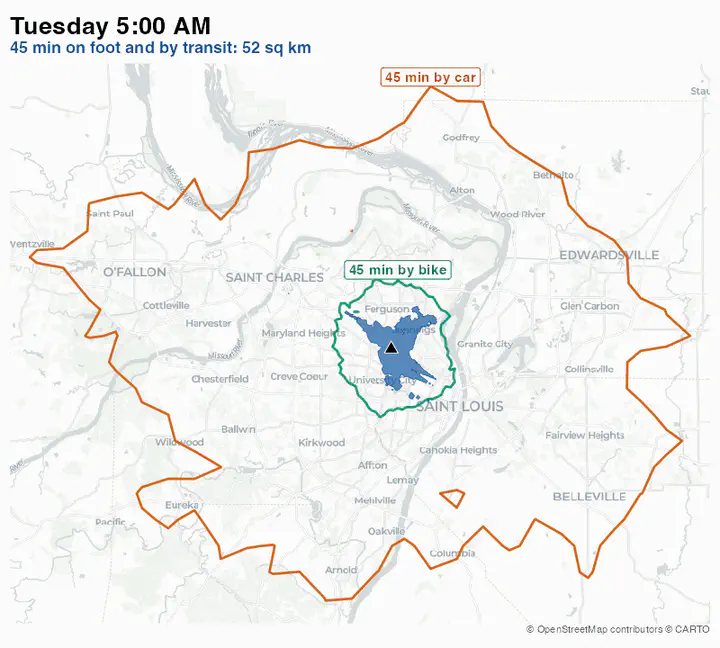
Introduction
Understanding the reach and effectiveness of public transit is important to understand how urban environments are accessible for different groups of people. Analysing fixed route public transit has become relatively straightforward with the introduction of the “General Transit Feed Specification,” a common standard for transit agencies to publish their schedules. Pioneered by TriMet of Portland, Oregon in collaboration with Google, this specification has become common for transit agencies around the world to publish their consumer facing datasets.
GTFS is split into a schedule component that contains schedule, fare, and geographic transit information and a real-time component that contains arrival predictions, vehicle positions and service advisories. Static GTFS consists of routes, trips, stop_times, stops and calendar as mandatory tables. There are also other optional tables such as fares and frequencies. Real Time GTFS (gtfs-rt) consists of trip updates, service interruptions etc.
Reading in GTFS files
Because GTFS are regularly updated (usually semi-annually) and published on transit agency’s website, it is a good idea to get the latest schedule. Fortunately, Mobility Database has a catalogue of various GTFS feeds and their source locations. In this tutorial, I am going to use Metro St. Louis GTFS feed.
I am going to use the tidytransit package. read_gtfs reads the zipfile and converts it into a bunch of tables.
I am going to use an archived copy of that feed for consistency.
See here if you want to know how to download
library(readr)
library(dplyr)
library(here)
catalog_url <- "https://storage.googleapis.com/storage/v1/b/mdb-csv/o/sources.csv?alt=media"
gtfs_feeds <- read_csv(catalog_url) |>
filter(mdb_source_id == 190) |> # Metro St. Louis
pull(urls.direct_download)
gtfs_feeds
## Download and read the feed. Particularly helpful if there are multiple feeds and/or multiple transit agencies in the area.
download_read_gtfs <- function(feed_url) {
zipfilename <- here("tutorials_datasets/gtfs", "stlouis_latest.zip")
download.file(feed_url, destfile = zipfilename, mode = "wb")
return(tidytransit::read_gtfs(zipfilename))
}
stlouis_gtfs <- download_read_gtfs(gtfs_feeds)
summary(stlouis_gtfs)
library(tidytransit)
library(dplyr)
library(purrr)
library(sf)
library(units)
library(here)
library(knitr)
library(lubridate)
library(tmap)
library(tmap.mapgl) # adds the "maplibre" mode, which draws vector basemaps such as OpenFreeMap
stlouis_gtfs <- here("tutorials_datasets/gtfs/google_transit.zip") |> read_gtfs() # Change the file path appropriately.
summary(stlouis_gtfs)
# tidygtfs object
# files agency, routes, stop_times, trips, shapes, calendar, calendar_dates, stops
# agency Metro St. Louis
# service from 2026-11-02 to 2026-11-29
# uses stop_times (no frequencies)
# # routes 61
# # trips 9796
# # stop_ids 5108
# # stop_names 5056
# # shapes 230
Notice that there are 61 routes with over 5,000 stops in the St. Louis region. Visualising these stops is pretty straightforward, once you convert them into sf objects.
stlouis_gtfs <- gtfs_as_sf(stlouis_gtfs, crs = 4326, quiet = TRUE)
stlouis_gtfs$stops
# Simple feature collection with 5108 features and 5 fields
# Geometry type: POINT
# Dimension: XY
# Bounding box: xmin: -90.66209 ymin: 38.46975 xmax: -89.87466 ymax: 38.80861
# Geodetic CRS: WGS 84
# # A tibble: 5,108 x 6
# stop_id stop_code stop_name stop_desc wheelchair_boarding
# * <chr> <chr> <chr> <chr> <int>
# 1 127 127 THEKLA @ EMERSON SB NEAR SID~ 2
# 2 166 166 WEST FLORISSANT @ BUZZ WESTF~ NEAR SID~ 1
# 3 172 172 SKINKER @ FOREST PARK PARKWA~ NEAR SID~ 1
# 4 236 236 MERCY HOSPITAL SOUTH NB FAR SIDE~ 2
# 5 249 249 CIVIC CENTER TRANSIT CENTER <NA> 1
# 6 273 273 STLCC FLORISSANT VALLEY FAR SIDE~ 1
# 7 314 314 175 BOULDER INDUSTRIAL MID-BLOC~ 2
# 8 315 315 DEPAUL @ DEPAUL HOSPITAL SB NEAR SID~ 1
# 9 353 353 ATHLETIC WAY @ RIDER TRAIL S~ FAR SIDE~ 2
# 10 393 393 CATALAN TRANSIT CENTER <NA> 1
# # i 5,098 more rows
# # i 1 more variable: geometry <POINT [arc_degree]>
tmap_mode("maplibre")
# One simplified line per route and only the mapped columns keep the web page small.
route_lines <- get_route_geometry(stlouis_gtfs) |>
st_line_merge() |>
st_transform(26915) |>
st_simplify(dTolerance = 50) |> #units are in m for 26915
st_transform(4326)
m1 <- tm_shape(route_lines) +
tm_lines(col = "steelblue", col_alpha = 0.6, group = "Routes") +
tm_shape(select(stlouis_gtfs$stops, stop_name)) +
tm_dots(fill = "firebrick", size = 0.05, id = "stop_name", popup = FALSE, group = "Stops") +
tm_basemap("ofm.positron", group = "OpenFreeMap basemap")
m1
Finding the Services for a Day
Trips have no dates of their own. Each trip has a service id, and the feed’s calendar says when that id runs. A service could run on every weekday or only on Saturdays, for example.
In this feed, the ids ending in B1, B2 and B3 are the bus schedules for weekdays, Saturdays and Sundays. Those ending in T1, T2 and T3 are the MetroLink train schedules for the same days. We use a typical weekday, Tuesday 10 November, for the rest of the tutorial. A service runs on that date if the date falls between its start and end dates and the service is marked as running on Tuesdays.
analysis_date <- as.Date("2026-11-10")
stlouis_gtfs$calendar |>
select(service_id, start_date, end_date, tuesday, saturday, sunday) |>
kable()
| service_id | start_date | end_date | tuesday | saturday | sunday |
|---|---|---|---|---|---|
| 324-B1 | 2026-11-02 | 2026-11-29 | 1 | 0 | 0 |
| 324-B2 | 2026-11-02 | 2026-11-29 | 0 | 1 | 0 |
| 324-B3 | 2026-11-02 | 2026-11-29 | 0 | 0 | 1 |
| 326-T1 | 2026-11-02 | 2026-11-06 | 1 | 0 | 0 |
| 326-T2 | 2026-11-07 | 2026-11-07 | 0 | 1 | 0 |
| 326-T3 | 2026-11-08 | 2026-11-08 | 0 | 0 | 1 |
| 324-T1 | 2026-11-09 | 2026-11-29 | 1 | 0 | 0 |
| 324-T2 | 2026-11-14 | 2026-11-29 | 0 | 1 | 0 |
| 324-T3 | 2026-11-15 | 2026-11-29 | 0 | 0 | 1 |
service_ids <- stlouis_gtfs$calendar |>
filter(start_date <= analysis_date,
end_date >= analysis_date,
tuesday == 1) |>
pull(service_id)
stlouis_gtfs$trips |>
filter(service_id %in% service_ids) |>
count(service_id) |>
kable(col.names = c("Service id", "Trips"))
| Service id | Trips |
|---|---|
| 324-B1 | 3463 |
| 324-T1 | 250 |
The calendar table holds only the regular weekly pattern. Exceptions are in calendar_dates, where an exception_type of 1 adds a service on that date and 2 removes it.
kable(stlouis_gtfs$calendar_dates)
| service_id | exception_type | date |
|---|---|---|
| 324-T1 | 2 | 2026-11-26 |
| 324-T3 | 1 | 2026-11-26 |
| 324-B1 | 2 | 2026-11-26 |
| 324-B3 | 1 | 2026-11-26 |
This is how Thanksgiving gets the Sunday schedule. All the exceptions are on 26 November, so they do not change the services on 10 November. If you pick a date with exceptions, you will need to apply them too.
Getting route frequencies is straightforward when we know which services we want to use. tidytransit takes the time window as "HH:MM:SS" strings, but reports headways in seconds. Please pay explicit attention to the units and their conversion.
to_minutes <- function(x) {
return(set_units(set_units(x, "s"), "min"))
}
midday_route_freq <- get_route_frequency(stlouis_gtfs, service_ids = service_ids,
start_time = "11:00:00", end_time = "16:00:00") |>
mutate(across(ends_with("headways"), to_minutes))
route_freq_sf <- route_lines |>
inner_join(midday_route_freq, by = "route_id") |>
left_join(select(stlouis_gtfs$routes, route_id, route_short_name, route_long_name), by = "route_id") |>
mutate(frequency = 1 / set_units(median_headways, "hr"),
trips_per_hr = drop_units(frequency)) |> # tmap needs plain numbers
select(route_short_name, route_long_name, trips_per_hr) |>
arrange(trips_per_hr) # the frequent routes are drawn last, on top
route_colours <- c("#56B4E9", "#009E73", "#E69F00", "#C2185B")
route_classes <- c("1 or less", "1 to 2", "2 to 3", "More than 3")
m2 <- tm_shape(route_freq_sf) +
tm_lines(col = "trips_per_hr",
col.scale = tm_scale_intervals(breaks = c(0, 1, 2, 3, 6),
values = route_colours,
labels = route_classes),
col.legend = tm_legend_hide(),
lwd = 2.5,
id = "route_long_name",
group = "Routes") +
tm_basemap("ofm.positron", group = "OpenFreeMap basemap")
# tmap draws this legend with lines of one colour, so use the mapgl legend instead.
tmap_maplibre(m2) |>
mapgl::add_categorical_legend(legend_title = "Trips per hour",
values = route_classes,
colors = route_colours,
patch_shape = "line",
position = "bottom-left",
style = mapgl::legend_style(background_color = "white",
background_opacity = 1))
While it is fine to know which routes are more frequent than others, it is also useful to know which stops have smaller headways and more frequent departures.
midday_stops <- get_stop_frequency(stlouis_gtfs, start_time = "11:00:00", end_time = "16:00:00",
service_ids = service_ids, by_route = FALSE) |>
arrange(mean_headway)
Notice that stop frequencies are summarised by service id. Since the buses and the trains run on the same day, we add their departures and work out the headway from the total.
midday_window <- set_units(5, "hr")
midday_stops_summ <- midday_stops |>
summarise(n_departures = sum(n_departures, na.rm = TRUE), .by = stop_id) |>
mutate(mean_headway = set_units(midday_window / n_departures, "min")) |>
arrange(mean_headway) |>
left_join(st_drop_geometry(select(stlouis_gtfs$stops, stop_id, stop_name)), by = "stop_id") |>
relocate(stop_name, .after = stop_id)
# Some stops have less than a 3 min wait. However, note that this is not by route, because we set the argument in such a way in earlier piece of code
midday_stops_summ |>
slice_head(n = 5) |>
mutate(mean_headway = drop_units(mean_headway)) |>
kable(digits = 1, col.names = c("Stop id", "Stop", "Departures", "Mean headway (min)"))
| Stop id | Stop | Departures | Mean headway (min) |
|---|---|---|---|
| 13330 | NORTH HANLEY TRANSIT CENTER | 120 | 2.5 |
| 14792 | CENTRAL WEST END TRANSIT CENTER | 113 | 2.7 |
| 14330 | 5TH & MISSOURI TRANSIT CENTER | 111 | 2.7 |
| 11102 | BELLEVILLE TRANSIT CENTER | 90 | 3.3 |
| 14124 | FAIRVIEW HEIGHTS TRANSIT CENTER | 84 | 3.6 |
# Some stops have more than 2 hr wait between the buses
midday_stops_summ |>
slice_tail(n = 5) |>
mutate(mean_headway = drop_units(mean_headway)) |>
kable(digits = 1, col.names = c("Stop id", "Stop", "Departures", "Mean headway (min)"))
| Stop id | Stop | Departures | Mean headway (min) |
|---|---|---|---|
| 6912 | ST CHARLES ROCK ROAD @ NORTHWEST INDUSTRIAL EB | 2 | 150 |
| 6914 | ST. CHARLES ROCK ROAD @ TAUSSIG EB | 2 | 150 |
| 6915 | ST. CHARLES ROCK ROAD @ PENNRIDGE EB | 2 | 150 |
| 15619 | VALLEY INDUSTRIES LOOP | 1 | 300 |
| 6086 | FLEISCHER @ LHB INDUSTRIES WB | 1 | 300 |
stops_freq_sf <- stlouis_gtfs$stops |>
select(stop_id) |>
inner_join(midday_stops_summ, by = "stop_id") |>
mutate(bubble_size = n_departures^2, # squared, to set the busy stops apart
tip = paste0(stop_name, ": ", round(drop_units(mean_headway)), " min headway")) |>
select(stop_name, n_departures, mean_headway, bubble_size, tip)
# Label the busiest stops and the longest waits in place of a legend.
stop_labels <- bind_rows(slice_max(stops_freq_sf, n_departures, n = 3, with_ties = FALSE),
slice_max(stops_freq_sf, mean_headway, n = 1, with_ties = FALSE)) |>
mutate(label = tip)
m3 <- tm_shape(route_lines) +
tm_lines(col = "steelblue", col_alpha = 0.2, group = "Routes") +
tm_shape(stops_freq_sf) +
tm_dots(fill = "firebrick", fill_alpha = 0.6,
size = "bubble_size",
size.scale = tm_scale_continuous(values.scale = 1.5),
size.legend = tm_legend_hide(),
id = "tip",
popup = FALSE,
group = "Stops") +
tm_basemap("ofm.positron", group = "OpenFreeMap basemap")
# tmap's maplibre mode has no text layer, so labels are added to the finished map with mapgl.
add_labels <- function(map, labels) {
labelled <- mapgl::add_symbol_layer(map,
id = "labels",
source = labels,
text_field = mapgl::get_column("label"),
text_font = list("Noto Sans Bold"), # stands out from the basemap's labels
text_size = 14,
text_color = "black",
text_halo_color = "white",
text_halo_width = 2.5,
text_anchor = "top",
text_offset = c(0, 0.5),
text_allow_overlap = TRUE)
return(labelled)
}
add_labels(tmap_maplibre(m3), stop_labels)
Notice how some stops have more frequent departures and some have long wait times. There are some spatial patterns. The classic hub and spoke transit system means that the downtown (hub) have a lot of stops that have high quality transit. However, there are also some transit centres at the outskirts that also have large number of departures. These serve as transfer stations or terminus.
Exercise 1: Frequency by route, time and season
-
Notice that these stop frequencies do not account for routes. However, it may be more useful to get the frequencies averaged by the route. Does the geography of access change?
-
In the above, only midday weekday services are mapped out. What about other patterns? Saturday Morning might have a different accessibility pattern. Think about how to analyse them and represent the variation over day as well as over the week.
-
If there are seasonal variations, it would be helpful to know. For example, university transit systems have reduced operations during Winter and Summer breaks. Using the above as a template, and Duke University transit as your public transit system, figure out the seasonal variations in accessibility.
Hint: Pick the service ids from the calendar for one date at a time, as we did for 10 November, then reuse the stop frequency code.
Solution
Frequency by route
for the same date and midday window, get stop frequencies split by route
for each stop, keep the shortest headway among the routes that serve it
join the result to the stop locations
map it the same way as the combined departures and compare the two maps
The transit centers lead the combined map because many routes meet there. North Hanley has a departure every 2.5 min across all routes, but no single route comes more often than every 20 min. By route, the stops along the busiest corridors such as Grand move to the top, at about 11.5 min.
Variation over the day and the week
choose one date for each day type: weekday, Saturday, Sunday
choose time windows: morning, midday, afternoon, evening
for each date and window:
find the service ids running on that date
get stop frequencies for those services and that window
add the departures at each stop
divide by the length of the window to get departures per hour
tabulate system wide departures per hour by day type and window
map the stops as small multiples, one panel for each combination
Windows of different lengths are only comparable per hour. Weekday service is about the same in the morning and at midday. Midday service on Saturday is about 30% lower and on Sunday lower still. A weekday evening looks much like a Saturday.
Seasonal variation at Duke
download the Duke University feed from the catalogue
list which service ids run on which dates and how many trips each one has
add up the trips on each date and plot them through the feed's date range
choose a date from each distinct period
repeat the stop frequency analysis for each one and compare the maps
The current feed only covers January to August 2025, and weekday trips step up from about 800 to about 870 in May. A single feed cannot show periods outside its own dates, so a full year needs archived feeds.
Accessibility as Cumulative Opportunity
While it is useful to think of accessibility as frequency of transit at a particular location, that indicator does not tell us much about the system level accessibility. While a specific bus station might have frequent departures, it may be on a line that is broadly disconnected from the rest of the transit system (e.g. connected to other lines that have significant wait times). It is thus useful to measure accessibility as opportunities that can be accessed within a travel budget (say 45 minutes). To do compute these, it is useful to figure out how much area can be covered within 45 min of travel time.
It is reasonably straightforward to figure out how much area can be covered by foot using routing engines such as OSRM. The tricky bit is to figure out how much time is spent waiting at transit stations before boarding the buses/trains and during transfers.
Typically, accessibility is measured for centroids of population centers (block groups e.g.). However, any origin set should be fine. I select the the three counties for the analysis (St. Clair in IL and St. Louis City, St. Louis County in MO)
transitstops <- stlouis_gtfs$stops
get_centroids <- function(state, county) {
centroids <- tigris::block_groups(state = state, county = county, year = 2024, progress_bar = FALSE) |>
st_centroid() |>
st_transform(st_crs(transitstops)) |>
select(GEOID)
return(centroids)
}
blkgrps <- bind_rows(get_centroids("MO", c("510", "189")),
get_centroids("IL", "163"))
An analytical decision to make early on is to assign the origin to a nearest starting point on the transit network or to the nearest starting point on the road (foot/bike) network. It is always more computationally expensive to model both the first and last mile of travel. In this tutorial, I will demonstrate how this might be possible.
We do this in three steps.
- Use OSRM to model what can be reached on foot.
- Use
tidytransitto model what can be reached by transit. - Combine the two.
A transit journey is made up of three legs. Here is one from a block group, leaving at 6:20 AM with a budget of 45 minutes on a weekday. I will use this time for the rest of the tutorial.
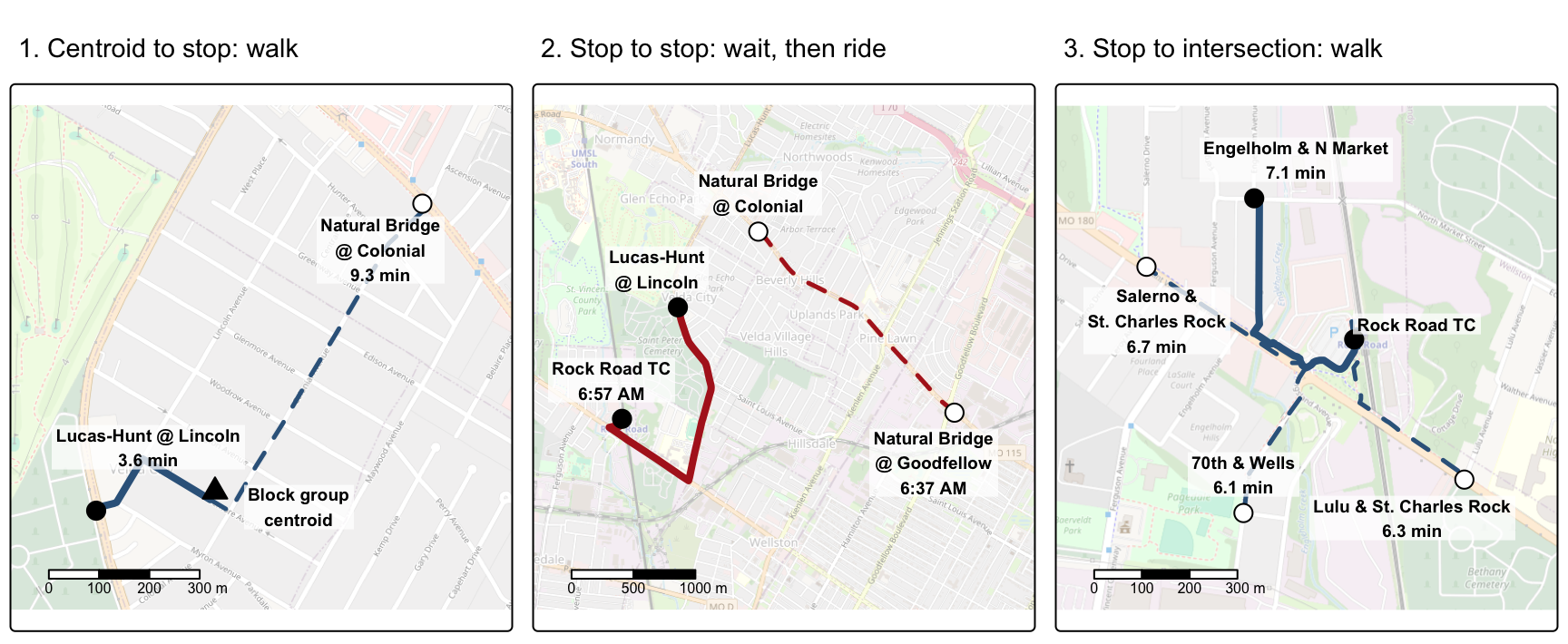
Solid lines follow one journey. The walk reaches Lucas-Hunt @ Lincoln by 6:24 AM, but the next Line 64 bus leaves only at 6:52 AM. It arrives at the transit center at 6:57 AM, which leaves 8 minutes of the budget, enough to walk to any of the four intersections in the third panel.
Dashed lines show other options. A longer walk to Natural Bridge @ Colonial catches a Line 4 bus at 6:30 AM going the other way, and it reaches Goodfellow by 6:37 AM with 28 minutes left. Walking is modelled with OSRM (legs 1 and 3), and waiting and riding are modelled with tidytransit (leg 2).
Connecting to a routing server
We will use a cloud server for the queries in this tutorial. Its address does not belong in shared code, so it goes in your .Renviron file (usethis::edit_r_environ() opens it). You should have received an email about this. Mind the trailing slash and restart R after you save the file.
OSRM_URL='http://address-of-the-server/'
library(osrm)
options(osrm.server = Sys.getenv("OSRM_URL"),
osrm.profile = "foot")
Step 1: Walking reachability with OSRM
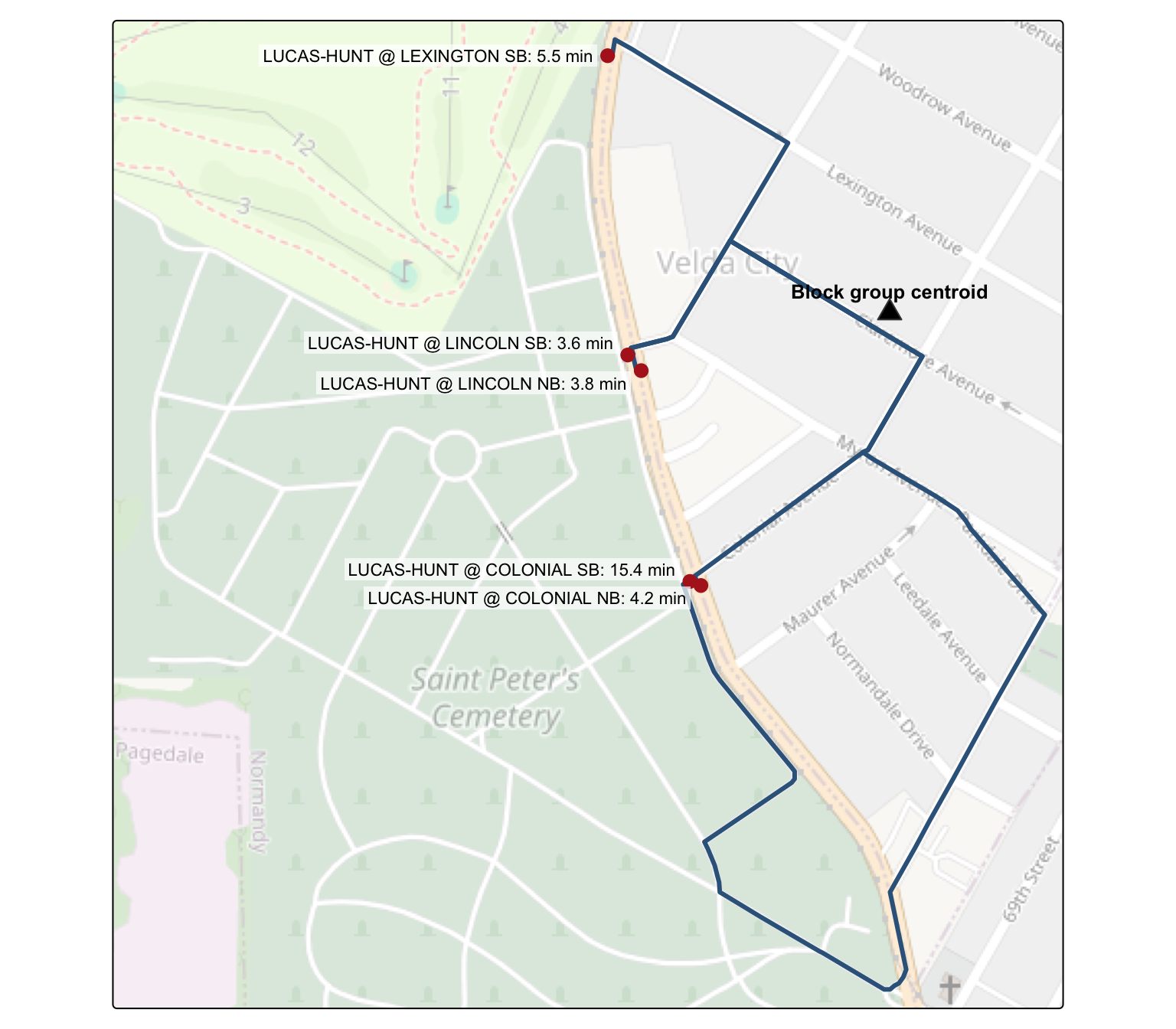
Let us work through through the queries for a single block group. osrmRoute returns the path, duration and distance of a walk from an origin (block group centroid) to a destination (transit stop).
blkgrp_id <- "291892138006"
origin <- filter(blkgrps, GEOID == blkgrp_id)
straight_line <- st_distance(transitstops, origin)[, 1]
closest_stops <- transitstops[order(straight_line)[1:5], ]
walk_paths <- map(seq_len(nrow(closest_stops)), function(i) {
return(osrmRoute(src = origin, dst = closest_stops[i, ], overview = "full"))
}) |>
bind_rows()
closest_stops |>
st_drop_geometry() |>
transmute(stop_name,
straight_line_m = drop_units(sort(straight_line)[1:5]),
walk_min = walk_paths$duration) |>
kable(digits = 1, col.names = c("Stop", "Straight line (m)", "Walk (min)"))
| Stop | Straight line (m) | Walk (min) |
|---|---|---|
| LUCAS-HUNT @ LINCOLN NB | 230.2 | 3.8 |
| LUCAS-HUNT @ LINCOLN SB | 239.4 | 3.6 |
| LUCAS-HUNT @ COLONIAL NB | 299.4 | 4.2 |
| LUCAS-HUNT @ COLONIAL SB | 302.2 | 15.4 |
| LUCAS-HUNT @ LEXINGTON SB | 344.4 | 5.5 |
The closest stop in a straight line need not be the quickest to walk to, because the walk follows the street network.
# Each pair of stops nearly coincides, so one label of each pair moves up and the other down.
stop_labels <- closest_stops |>
mutate(walk_min = walk_paths$duration,
label = paste0(stop_name, ": ", round(walk_min, 1), " min"),
label_shift = c(-0.6, 0.6, -0.6, 0.6, 0))
# Widen the map to the west to make room for the labels.
map_area <- st_bbox(walk_paths)
map_area["xmin"] <- map_area["xmin"] - 0.005
m_paths <- tm_shape(walk_paths, bbox = map_area) +
tm_basemap("OpenStreetMap", alpha = 0.4, zoom = 16) +
tm_lines(col = "steelblue4", lwd = 3) +
tm_shape(stop_labels) +
tm_dots(fill = "firebrick", size = 0.6) +
tm_text("label", size = 0.7, xmod = -0.7, bgcol = "white", bgcol_alpha = 0.7,
ymod = "label_shift", ymod.scale = tm_scale_asis(),
options = opt_tm_text(just = "right", remove_overlap = FALSE)) +
tm_shape(mutate(origin, label = "Block group centroid")) +
tm_symbols(shape = 24, fill = "black", size = 0.8) +
tm_text("label", size = 0.8, fontface = "bold", ymod = 0.9)
tmap_mode("plot")
print(m_paths)
tmap_mode("maplibre")
sfnetworks.
A route answers for one destination at a time. To know everything that can be reached on foot, osrmIsochrone returns the area that can be reached from a location within given times. We ask for every minute up to 45 min, which is our travel budget.
walk_bands <- osrmIsochrone(loc = origin, breaks = seq(0, 45, 1)) |>
st_make_valid() |>
mutate(label = cut(isomax, breaks = c(0, 15, 30, 45),
labels = c("0 to 15 min", "15 to 30 min", "30 to 45 min")))
# This mode draws numbered shapes as circles, so the triangle for the centroid is a small drawing.
centroid_triangle <- grid::polygonGrob(x = c(0.05, 0.5, 0.95), y = c(0.1, 0.9, 0.1),
gp = grid::gpar(fill = "black", col = "white", lwd = 2))
# Label each 15 min band on its outermost ring.
band_labels <- walk_bands |>
filter(isomax %in% c(15, 30, 45)) |>
st_transform(26915) |>
st_make_valid() |>
st_point_on_surface() |>
st_transform(4326)
m4 <- tm_shape(walk_bands) +
tm_polygons(fill = "label",
fill.scale = tm_scale_categorical(values = c("#08519c", "#4292c6", "#c6dbef")),
fill.legend = tm_legend_hide(),
fill_alpha = 0.7,
col_alpha = 0,
id = "label",
group = "Isochrone bands") +
tm_shape(origin) +
tm_symbols(shape = centroid_triangle, size = 0.8, id = "GEOID", group = "Block group centroid") +
tm_basemap("ofm.positron", group = "OpenFreeMap basemap")
add_labels(tmap_maplibre(m4), band_labels)
Notice that each row is a ring around the earlier rows (e.g. can be reached between 44 and 45 min). What we need is the cumulative isochrone (e.g. reached within 45 min), which is the ring with its holes filled.
fill_holes <- function(x) {
filled <- x |>
st_geometry() |>
st_transform(26915) |>
st_make_valid() |>
nngeo::st_remove_holes()
return(filled)
}
walk_rings <- filter(walk_bands, isomax %in% c(15, 30, 45))
tibble(within_min = walk_rings$isomax,
area = drop_units(set_units(st_area(fill_holes(walk_rings)), km^2))) |>
kable(digits = 2, col.names = c("Within (min)", "Area (sq km)"))
| Within (min) | Area (sq km) |
|---|---|
| 15 | 1.42 |
| 30 | 7.99 |
| 45 | 20.62 |
This walking does not depend on start and stop time. We will assume that people will take the same path regardless of time, weather and lighting conditions. This is a simplifying assumption, perhaps an unreasonable one.
Step 2: Transit reachability with tidytransit
The transit trip is computed using the Round-Based Public Transit Routing Algorithm (RAPTOR) for each start time. But first we need to make a transfer table; what stops on a different line is reachable from a stop. Typically GTFS should come with one that specifies the time taken to transfer between two stations (within reasonable time frame). Since we do not have it here in the St. Louis GTFS, we infer one based on distance (typically within 200 m) and a walking speed of 5 km/h.
walking_speed <- set_units(5, "km/h")
neighbours <- st_is_within_distance(transitstops, dist = set_units(200, "m"))
stlouis_gtfs$transfers <- tibble(from = rep(seq_along(neighbours), lengths(neighbours)),
to = unlist(neighbours)) |>
mutate(from_stop_id = transitstops$stop_id[from],
to_stop_id = transitstops$stop_id[to],
distance = st_distance(transitstops[from, ], transitstops[to, ], by_element = TRUE),
transfer_type = 2L, #
min_transfer_time = drop_units(set_units(distance / walking_speed, "s"))) |> # raptor wants plain seconds
select(from_stop_id, to_stop_id, transfer_type, min_transfer_time)
Once the permissible and possible transfers are recorded, we move on to modeling transit rides. Unlike the walk, the transit trip depends on when one leaves. Each stop falls in one of the 1 min bands from Step 1, so we know when we can be at each stop without a route to every one. We search the network from there.
start_clock <- "6:20"
start_time <- ymd_hm(paste(analysis_date, start_clock), tz = "America/Chicago")
blk_start_time <- period_to_seconds(hm(start_clock))
blk_end_time <- blk_start_time + period_to_seconds(minutes(45))
# Trips on a single weekday within the travel budget. All the searches below share this table.
transit_stop_times <- filter_stop_times(stlouis_gtfs, analysis_date,
min_departure_time = blk_start_time,
max_arrival_time = blk_end_time)
# The walk to each station is the 1 min isochrone band of the block group that it falls in.
travel_to_stations <- transitstops |>
select(stop_id) |>
st_join(select(walk_bands, isomax), left = FALSE) |>
st_drop_geometry() |>
slice_min(isomax, n = 1, by = stop_id, with_ties = FALSE) |>
filter(stop_id %in% transit_stop_times$stop_id) |>
mutate(walk_time = set_units(isomax, "min"),
earliest_departure = blk_start_time + drop_units(set_units(walk_time, "s")))
# For each station that can be reached on foot, the other stations reached by transit in the budget.
journeys_from_station <- function(stop_id, earliest_departure) {
journeys <- raptor(transit_stop_times,
stlouis_gtfs$transfers,
stop_ids = stop_id,
time_range = c(earliest_departure, blk_end_time),
max_transfers = 3,
keep = "earliest")
return(journeys)
}
has_rows <- function(x) {
return(nrow(x) > 0)
}
# The remaining time from the travel budget, keeping the best journey to each station.
remain_time_dt <- map2(travel_to_stations$stop_id,
travel_to_stations$earliest_departure,
journeys_from_station) |>
keep(has_rows) |>
list_rbind() |>
as_tibble() |>
mutate(remain_time = to_minutes(blk_end_time - journey_arrival_time)) |>
filter(remain_time > set_units(0, "min")) |>
slice_max(remain_time, n = 1, by = to_stop_id, with_ties = FALSE) |>
select(to_stop_id, remain_time)
reached_stops <- transitstops |>
inner_join(remain_time_dt, by = c("stop_id" = "to_stop_id")) |>
mutate(remain_min = drop_units(remain_time),
distance = st_distance(geometry, origin)[, 1]) |>
select(stop_name, remain_min, distance)
tibble(stops = nrow(reached_stops),
median_left = median(reached_stops$remain_min)) |>
kable(digits = 1, col.names = c("Stops reached", "Median time left (min)"))
| Stops reached | Median time left (min) |
|---|---|
| 417 | 6 |
left_labels <- reached_stops |>
filter(stop_name %in% c("LUCAS-HUNT @ LINCOLN NB",
"GOODFELLOW @ NATURAL BRIDGE SB",
"ST. CHARLES ROCK ROAD @ DIX WB",
"UNIVERSITY CITY-BIG BEND METROLINK STATION",
"GRAND METROLINK STATION")) |>
mutate(label = paste0(stop_name, ": ", round(remain_min), " min left"))
m_reached <- tm_shape(route_lines) +
tm_lines(col = "steelblue", col_alpha = 0.4, group = "Routes") +
tm_shape(reached_stops) +
tm_dots(fill = "firebrick", size = 0.2, id = "stop_name", popup = FALSE, group = "Stops reached") +
tm_shape(origin) +
tm_symbols(shape = centroid_triangle, size = 0.8, id = "GEOID", group = "Block group centroid") +
tm_basemap("ofm.positron", group = "OpenFreeMap basemap")
add_labels(tmap_maplibre(m_reached), left_labels) |>
mapgl::fit_bounds(reached_stops, padding = 40)
Each red dot is a stop that can be reached by 7:05 AM, and the labels show how much time is left to walk from a few of them.
Step 3: Combining walking and transit
From each stop reached, we walk on in the time left on the budget. That needs a walking isochrone from a stop, for each of the 417 stops reached. Now the origin is the transit stop and destination is an intersection.
To save time, I computed these once on my own computer, using OpenStreetMap data from November 2026. You do not need to repeat it. The rest of this tutorial uses these precomputed results instead of querying a server, so download the RData file and change the paths.
stop_iso is a list of 1 min isochrone bands for each stop. blkgrp_iso is the same for each block group. Both are named by stop id and GEOID, to easily filter and identify. The file also holds a travel time matrix that we do not use. Results from the cloud server may differ slightly, because its map data can be of a different date.
load(here("tutorials_datasets/gtfs/ttmatrix.RData"))
length(blkgrp_iso)
# [1] 1260
length(stop_iso)
# [1] 5108
If you want to compute them yourself
There are two ways to do it.
Query the cloud server. You can run the full code below against the cloud server, but keep the following in mind.
- It is a small shared machine. A long run slows everyone else down and may crash the server.
- It can go down without notice, and a crash partway through loses whatever has not been saved. Save the results in batches as you go.
- It does not have all of the US. The snapping check in the code below guards against locations outside its network.
Set up your own server. This is the better choice for a full run. Download the latest OpenStreetMap data for Missouri and Illinois from Geofabrik. Then run the following in a terminal to build a foot network clipped to the region and start the server (more on setting up OSRM). On a Mac, AirPlay already uses the usual port 5000, so the server listens on 5001. --max-table-size has to be large enough for the grid of points behind each isochrone. Change OSRM_URL to http://localhost:5001/ to use it.
osmium merge missouri-latest.osm.pbf illinois-latest.osm.pbf -o merged.osm.pbf
osmium extract -b -90.90,38.10,-89.55,39.00 merged.osm.pbf -o stlouis.osm.pbf
osrm-extract stlouis.osm.pbf -p /usr/local/share/osrm/profiles/foot.lua
osrm-contract stlouis.osrm
osrm-routed --algorithm ch --port 5001 --max-table-size 6000 stlouis.osrm
The code for the full run is the same for both. OSRM moves each location to the closest road, so a location that has to move too far gets NA.
max_snap <- set_units(1, "km")
# TRUE when OSRM had to move a location too far to trust the result.
snapped_too_far <- function(snapped) {
return(set_units(snapped$snapping_distance, "km") > max_snap)
}
one_minute_bands <- function(location) {
# osrmIsochrone does not report how far it moved the location, so ask osrmTable.
snapped <- osrmTable(src = location, dst = location, measure = "duration")$sources
if (snapped_too_far(snapped)) {
return(NA)
}
return(osrmIsochrone(loc = location, breaks = seq(0, 45, 1)))
}
isochrones_for <- function(locations, ids) {
iso <- map(seq_len(nrow(locations)), possibly(function(i) {
return(one_minute_bands(locations[i, ]))
}, otherwise = NULL))
names(iso) <- ids
return(iso)
}
blkgrp_iso <- isochrones_for(blkgrps, blkgrps$GEOID)
stop_iso <- isochrones_for(transitstops, transitstops$stop_id)
For each stop reached, take the isochrone for the time left on the budget. For example, a stop with 12 min left is reached at 6:53 AM, and its isochrone covers the walk from 6:53 to 7:05 AM. To combine them, we backdate each isochrone to the start time at the centroid. Each one then means the same thing: reachable within 45 min of leaving the block group at 6:20 AM. The walking isochrone from Step 1 already starts there, so all of them can be unioned into one polygon, which we stamp with that start time.
# For a reachable station, the isochrone for the time left. It starts on arrival at that station.
iso_within <- function(stop_id, remain_minutes) {
# Transfers make the time left fractional, and the bands are in whole minutes.
iso <- filter(stop_iso[[stop_id]], isomax == floor(remain_minutes))
return(st_geometry(iso))
}
transit_reach <- map2(remain_time_dt$to_stop_id,
drop_units(remain_time_dt$remain_time),
iso_within) |>
list_c() |>
fill_holes()
# The whole budget spent on foot from the block group centroid.
walk_reach <- walk_bands |>
slice_max(isomax, n = 1, with_ties = FALSE) |>
fill_holes() |>
st_union()
# Union the isochrones from the stations with the walking isochrone of the block group.
geo_sf <- c(transit_reach, walk_reach) |>
st_union() |>
st_make_valid()
# the polygon carries the start time at the centroid, not the arrival times at the stations.
timestamped_reach <- st_sf(GEOID = blkgrp_id,
start_time = start_time,
area = set_units(st_area(geo_sf), km^2),
geometry = st_transform(geo_sf, 4326))
reach_summary <- tibble(mode = c("Walk only", "Walk and transit"),
area = set_units(c(st_area(walk_reach), st_area(geo_sf)), km^2))
reach_summary |>
mutate(area = drop_units(area)) |>
kable(digits = 1, col.names = c("Mode", "Area reached in 45 min (sq km)"))
| Mode | Area reached in 45 min (sq km) |
|---|---|
| Walk only | 20.6 |
| Walk and transit | 36.1 |
# Place the transit label at the closest reachable station that is beyond walking distance.
beyond_walk <- reached_stops[st_disjoint(st_transform(reached_stops, 26915), walk_reach, sparse = FALSE)[, 1], ]
label_stop <- beyond_walk[which.min(st_distance(beyond_walk, origin)), ]
reach_labels <- st_sf(label = paste0(reach_summary$mode, ": ",
round(drop_units(reach_summary$area)), " sq km"),
geometry = c(st_transform(st_point_on_surface(walk_reach), 4326),
st_geometry(label_stop)))
m5 <- tm_shape(timestamped_reach) +
tm_polygons(fill = "steelblue", fill_alpha = 0.4, col = "steelblue4", group = "Walk and transit") +
tm_shape(st_transform(walk_reach, 4326)) +
tm_polygons(fill = "#08306b", fill_alpha = 0.4, col = "#08306b", group = "Walk only") +
tm_shape(origin) +
tm_symbols(shape = centroid_triangle, size = 0.8, id = "GEOID", group = "Block group centroid") +
tm_basemap("ofm.positron", group = "OpenFreeMap basemap")
add_labels(tmap_maplibre(m5), reach_labels)
The exercise below iterates over a vector of times and block groups, and each result is one more timestamped isochrone.
Exercise 2: Isochrones over time and space
-
Create a function that will take start time as an argument and return the transit+walk isochrones for a block group. Use it to compute the isochrones for every 10 min for a single block group
-
Create a function that will return the isochrones for a single start time, but for all block groups.
-
Combine the two functions and create the isochrones that change over time and over space for all of St. Louis. What story can you tell about diurnal variation in accessibility.
-
Repeat this exercise for a transit system that has significant weekly and seasonal variablity (e.g. Duke/Durham)
Hint: Everything that depends on the start time or the block group in the code above becomes an argument. Each combination takes about 10 s, so try a few block groups and start times before attempting all of them.
Solution
One block group, every 10 min
function reach(block group, start time):
end time = start time + travel budget
keep the stop times for the date between start time and end time
find the stops within walking distance before the end time
for each of those stops:
search the transit network from the time we arrive on foot until the end time
for each stop reached, keep the journey leaving the most time on the budget
for each stop reached, take its isochrone for the remaining time and fill its holes
union them with the block group's own walking isochrone
return the polygon, its start time and its area
for start time from 05:00 to 23:00, every 10 min:
reach(block group, start time)
If no stop can be reached in time, the function should return the walking isochrone alone.
All block groups, one start time
for each block group:
reach(block group, start time)
stack the results into one table with the GEOID, the start time and the area
Over time and space
for each start time:
for each block group:
reach(block group, start time)
summarise the area for each block group: median and spread across start times
summarise the area for each start time: median across block groups
map the median and the spread, and plot the area against the start time
Run this on a sample of block groups first, or in parallel. A single start time can mislead, because the area depends on how that time lines up with departures. For the block group above, the reach on foot is 21 sq km, while with transit it swings between about 25 and 88 sq km from 6 AM to 8 PM on a weekday without tracking the rush hour. A block group in the city (295101124002) reaches about 50 to 120 sq km when sampled every 20 min. So report a summary over many start times.
Other transit systems
build the routing network for Durham and precompute its isochrones
choose a date from each period and day type in the feed's calendar
repeat the steps above for each date and compare the summaries
Your goal is to get something that resembles this animation.
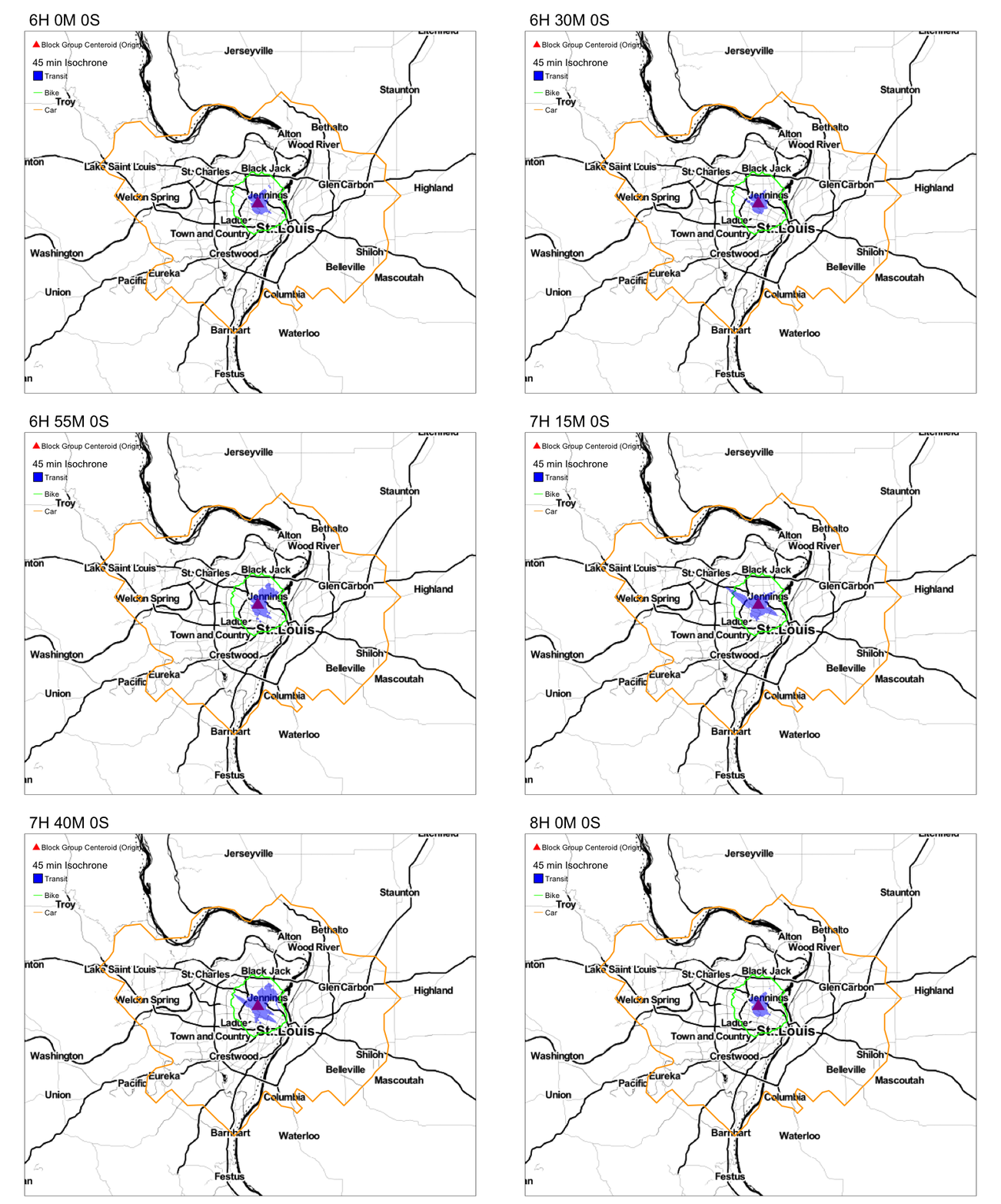
Notice the variation in the reacheable area by transit in 45 min. Compare that to the reacheable areas by biking and driving.
This is not yet cumulative opportunity measure. We know how far people can get to, not what they can reach. But it is straightforward to compute that if if you know the location of opportunities. I leave that as an exercise.
Exercise 3: Counting the opportunities
The isochrones above measure area. Turn them into a cumulative opportunity measure by counting the jobs that can be reached within the travel budget.
-
Get the number of jobs by census block for the three counties from the LEHD Origin-Destination Employment Statistics and count the jobs inside the timestamped isochrone of a block group.
-
Compare the jobs reached on foot alone with the jobs reached on foot and by transit.
-
Repeat this for all block groups and several start times. Which block groups gain the most from transit? Do they match the ones that gain the most area?
Hint: The block group above can reach a large area, but what matters is what lies within it. A small isochrone downtown may reach more jobs than a large one in the suburbs.
Solution
download the workplace employment table for Missouri and Illinois
keep the census blocks in the study area and join them to block locations
take the centroid of each block, in the same coordinate system as the isochrone
function jobs reached(isochrone):
find the block centroids inside the isochrone
return the sum of their jobs
for each block group and start time:
jobs on foot = jobs reached(walking isochrone)
jobs with transit = jobs reached(combined isochrone)
keep the GEOID, the start time and both counts
summarise each block group over its start times
map the median jobs reached and the gain from transit
A single start time can mislead here too, so think about the variation over the day and week. Jobs just outside the three counties are not counted, so block groups near the edge of the study area will look worse than they are, unless you add the neighbouring counties.
Conclusions
Cumulative Opportunity is only one type of accessibility measures and perhaps not even the most useful one. But the above code can be easily adapted to gravity based measures or even any other kind of time/distance decay weighting. In any case, it is important to recognise that accessibility is unevenly distributed in both space and in time. Cumulative Opportunity is as good as any in demonstrating this.
Also while GTFS is about schedules, it is important to note that real travel times on transit systems rarely conform to the schedule. It is useful to think about how real time information can be useful in understanding why transit may or may not be a viable option for different constraints of life. More importantly, the above analysis does not account for tours and has implicitly assumed trips as the basis for accessibility. Again, caution should be used to interpret these.

Nikhil Kaza
Professor
My research interests include urbanization patterns, local energy policy and equity