Using Tidycensus and NHGIS in R (version 2)
Introduction
The earlier tidycensus tutorial showed how to query the Census API and map poverty and unemployment. This one goes a step further: it builds a small but realistic tract-level dataset from several Census sources, and then uses it in a sequence of exercises.
What an API is
An Application Programming Interface (API) is a go-between that lets two programs talk to each other. When a phone app shows you the weather, it sends a structured request to a server, and the server looks up the data, packages it, and sends it back for the app to display. The US Census Bureau runs APIs like this. Instead of downloading spreadsheets by hand, you can ask the Census servers for exactly the variables, years, and places you need, straight from R.
Most requests need a free Census API key. It identifies you to the server, so keep it private.
Querying Census servers directly
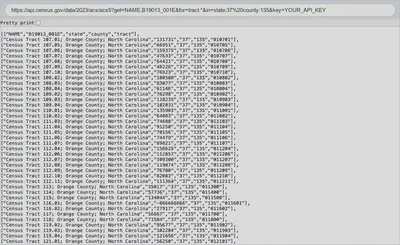
Every Census API request is a web address. With your key in place of YOUR_API_KEY, this one returns the median household income of every census tract in Orange County from the 2019–2023 American Community Survey:
https://api.census.gov/data/2023/acs/acs5?get=NAME,B19013_001E&for=tract:*&in=state:37%20county:135&key=YOUR_API_KEY
Read it piece by piece:
https://api.census.gov/data/2023/acs/acs5?is the endpoint: the five-year ACS ending in 2023, that is, 2019–2023.get=NAME,B19013_001Elists the variables: the place name and table B19013, median household income. TheEmeans estimate; the matching margin of error ends inM.for=tract:*is the geography: every tract.in=state:37%20county:135limits it to North Carolina (FIPS code 37) and Orange County (135).%20is an encoded space.key=...identifies you. The parts are joined with&.
When you paste this entire url in the browser, the server answers in JSON, a grid of text whose first row holds the column names. Every API has its own rules. They change over time, which is one reason code that worked last year can stop working.
Tidycensus
The tidycensus package wraps the Census API in R functions: get_decennial() for the census taken every ten years, and get_acs() for the American Community Survey. They build the request, send it, and return a tidy table, optionally with geometry. Kyle Walker’s Analyzing US Census Data covers it in depth.
Store your key once, and tidycensus adds it to every request:
library(tidycensus)
census_api_key("YOUR_API_KEY", install = TRUE)
install = TRUE writes the key to your .Renviron file, so it is available in every future R session.
The hardest part is usually finding the right variable codes. load_variables() lists every variable in a dataset so you can search it:
acs_vars <- load_variables(2023, "acs5", cache = TRUE)
acs_vars |> filter(str_detect(label, "Median household income"))
Two kinds of data are important distinguish:
- Decennial census counts (2010, 2020 etc.) try to count everyone. Since 2020 they carry deliberate small errors (“differential privacy”) to protect respondents, so very small counts are fuzzy.
- American Communty Survey (ACS) estimates come from a sample of households pooled over five years. Every estimate has a margin of error, and for small areas such as tracts it can be large. This post treats the estimates as if they were exact, when it really should not.
Building the dataset
For the sake of simplicity I focus on three counties in North Carolina.
counties <- c("Durham", "Orange", "Wake")
1. Tract boundaries
Census tracts are small statistical areas, usually 2,500 to 8,000 people, drawn to stay stable over time. The tigris package downloads their boundaries. cb = TRUE asks for the generalized cartographic boundary files, which are lighter and clipped to the shoreline. The 2023 files use the tract boundaries drawn for the 2020 Census.
library(tigris)
library(units)
library(tmap)
tr_shapes <- tracts(state = "NC", county = counties, cb = TRUE, year = 2023, progress_bar = FALSE) |>
  st_transform(32119) |>
  transmute(GEOID, county = NAMELSADCO |> str_remove(" County"),
            area_sqmi = ALAND |>
              units::set_units("m^2") |>     # ALAND is land area in square meters
              units::set_units("mi^2"))    # convert to square miles

tmap_mode('plot')  # static map: interactive maps don't render in .Rmarkdown posts

carto_positron <- paste0(
  "https://a.basemaps.cartocdn.com/rastertiles/light_all/{z}/{x}/{y}.png?key=",
  Sys.getenv("CARTO_API_KEY")
)
# An explicit carto URL is needed because Carto moved its tiles from /light_all to
# /rastertiles/light_all, and tmap's built-in "CartoDB.Positron" still points to the old path.

tm_shape(tr_shapes)+
  tm_borders(col='blue', lwd=.2)+
  tm_basemap(carto_positron)
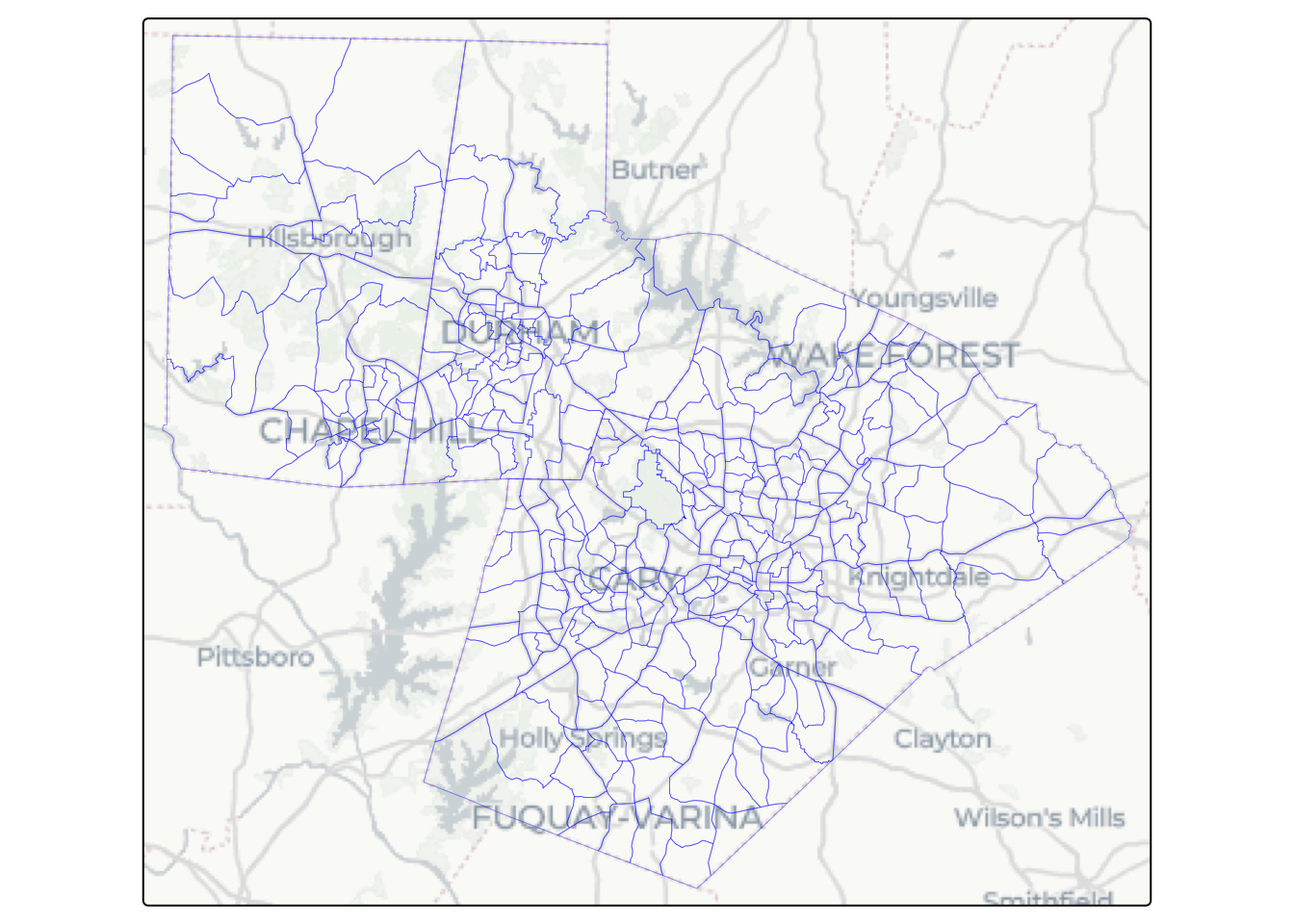
~/.Renviron file: CARTO_API_KEY=your_key_here, and restart R so Sys.getenv("CARTO_API_KEY") can find it. You can also use usethis::edit_r_environ(). Keeping keys in .Renviron keeps them out of your code.
st_transform(32119) moves the boundaries into NC State Plane, a projection in meters that keeps areas accurate in North Carolina. ALAND is land area in square meters but the units are not defined. The units package converts it to square miles: set_units("m^2") labels the number with its unit, and set_units("mi^2") converts it, so there is no conversion factor to look up or mistype. Whenever possible, use units to prevent errors, but they also create hiccups when comparing with numbers, so be mindful.
For example, to find tracts smaller than one square mile, comparing area_sqmi with a plain 1 fails, because R cannot tell whether 1 means square miles, acres, or square meters:
tr_shapes |> filter(area_sqmi < 1)
# Error in `stopifnot()`:
# i In argument: `area_sqmi < 1`.
# Caused by error in `Ops.units()`:
# ! both operands of the expression should be "units" objects
Give the number a unit as well. Any area unit works, and units converts before comparing, so 640 acres gives the same answer as 1 square mile:
tr_shapes |> filter(area_sqmi < set_units(1, "mi^2")) |> nrow()
# [1] 64
tr_shapes |> filter(area_sqmi < set_units(640, "acre")) |> nrow()
# [1] 64
2. Population in 2020
The 2020 redistricting file (sumfile = "pl") has total population (P1_001N) down to the block, the smallest Census geography. Blocks are nested within tracts.
blocks_pop_2020 <- get_decennial(geography = "block", state = "NC", county = counties,
                             variables = c(pop = "P1_001N"), year = 2020, sumfile = "pl",
                             progress_bar = FALSE) |>
  select(GEOID, pop = value)

glimpse(blocks_pop_2020)
# Rows: 21,212
# Columns: 2
# $ GEOID <chr> "370630001011000", "370630001011001", "370630001011002", "370630~
# $ pop   <dbl> 108, 35, 38, 43, 31, 55, 64, 23, 24, 37, 68, 39, 104, 50, 52, 48~
A block GEOID is a chain of codes, each nested in the one before:
| characters | code | example |
|---|---|---|
| 1–2 | state | 37 (North Carolina) |
| 3–5 | county | 063 (Durham) |
| 6–11 | tract | 000101 |
| 12–15 | block | 1000 |
So the first 11 characters of a block GEOID are the GEOID of the tract it sits in. Because 2020 blocks nest exactly inside 2020 tracts, cutting the GEOID to 11 characters and adding up gives the tract population:
tr_pop_2020 <- blocks_pop_2020 |>
  mutate(GEOID = str_sub(GEOID, 1, 11)) |>
  summarise(pop_2020 = sum(pop, na.rm=T), .by = GEOID)
glimpse(tr_pop_2020)
# Rows: 340
# Columns: 2
# $ GEOID    <chr> "37063000101", "37063000102", "37063000200", "37063000301", "~
# $ pop_2020 <dbl> 3282, 4430, 2893, 2644, 3672, 2564, 2966, 4192, 5507, 3701, 1~
The same trick gives any geography that nests: str_sub(GEOID, 1, 12) is the block group, and str_sub(GEOID, 1, 5) the county. As a check, the result matches the tract counts the Census publishes directly:
pop_2020_tr <- get_decennial(geography = "tract", state = "NC", county = counties,
                                variables = c(pop_2020 = "P1_001N"), year = 2020, sumfile = "pl",
                                progress_bar = FALSE) |>
  select(GEOID, pop_2020 = value)

all.equal(arrange(tr_pop_2020, GEOID), arrange(pop_2020_tr, GEOID), check.attributes = FALSE)
# [1] TRUE
3. Population in 2010, on 2020 tracts
Measuring growth needs the same areas in both years, but tract boundaries change every decade. Tracts that grew are split, so one 2010 tract can become two or three 2020 tracts with new GEOIDs; others are merged or redrawn. Joining 2010 and 2020 tables by GEOID would silently drop or mismatch exactly the fastest-growing places.
IPUMS NHGIS publishes crosswalks for this. Census blocks are the smallest areas, and the crosswalk gives, for each 2010 block, the share of its population in each 2020 tract. Multiply each 2010 block count by its weight and add up by 2020 tract, and you get the 2010 population on 2020 boundaries. Downloading the crosswalk needs an IPUMS API key, set with ipumsr::set_ipums_api_key().
library(ipumsr)
xwalk_zip <- download_supplemental_data(
  "nhgis", "crosswalks/nhgis_blk2010_tr2020_state/nhgis_blk2010_tr2020_37.zip",
  download_dir = tempdir(), overwrite = TRUE
)
# blk2010ge: 2010 block GEOID; tr2020ge: 2020 tract GEOID;
# weight: share of the block's population that falls in the tract
xwalk <- read_csv(unz(xwalk_zip, "nhgis_blk2010_tr2020_37.csv"),
                  col_types = cols(blk2010ge = "c", tr2020ge = "c", blk2010gj = "c",
                                   tr2020gj = "c", .default = "d")) |>
  filter(tr2020ge %in% tr_shapes$GEOID)

blocks_2010 <- get_decennial(geography = "block", state = "NC",
                             county = counties,
                             variables = c(pop = "P001001"), year = 2010, sumfile = "sf1") |>
  select(blk2010ge = GEOID, pop = value)

pop_2010 <- xwalk |>
  inner_join(blocks_2010, by = "blk2010ge") |>
  summarise(pop_2010 = round(sum(pop * weight)), .by = tr2020ge) |>
  rename(GEOID = tr2020ge)
A few tracts had very few people in 2010:
tr_pop_2020 |>
  left_join(pop_2010, by = "GEOID") |>
  mutate(pop_2010 = replace_na(pop_2010, 0)) |>
  filter(pop_2010 < 1000) |>
  arrange(pop_2010)
# # A tibble: 5 x 3
#   GEOID       pop_2020 pop_2010
#   <chr>          <dbl>    <dbl>
# 1 37183053619      501        0
# 2 37183980100        2        2
# 3 37063980100        9        4
# 4 37183980200        0       30
# 5 37183053609     1653      744
One Wake (37183) tract went from no residents to about 500. Percent growth from a base that small is enormous which matters in Exercise 1.
4. Households, renters, and income from the ACS
Two ACS tables describe household characteristics:
- B25003, Tenure:
B25003_001is all occupied housing units (households) andB25003_003those occupied by renters. - B19013, Median household income in the past 12 months.
tr_acs_hh_inc <- get_acs(geography = "tract", state = "NC", county = counties, year = 2023,
               survey = "acs5", output = "wide",
               variables = c(households = "B25003_001", renter_hh = "B25003_003",
                             med_income = "B19013_001")) |>
  select(GEOID, households = householdsE, renter_hh = renter_hhE, med_income = med_incomeE)
output = "wide" returns one row per tract with an estimate (E) and a margin of error (M) column per variable; only the estimates are kept here. Two quirks show up. Some tracts have no median income (NA), and a few have no households at all. To see why, add the 2020 count of people living in group quarters (P5_001N): dorms, nursing homes, prisons, and barracks, where residents are counted as people but not as households.
gq_2020 <- get_decennial(geography = "tract", state = "NC", county = counties, year = 2020,
                         sumfile = "pl", output = "wide",
                         variables = c(pop_2020 = "P1_001N", group_quarters = "P5_001N")) |>
  select(GEOID, pop_2020, group_quarters)

tr_acs_hh_inc |>
  filter(households < 10 | is.na(med_income)) |>
  left_join(gq_2020, by = "GEOID")
# # A tibble: 6 × 6
#   GEOID       households renter_hh med_income pop_2020 group_quarters
#   <chr>            <dbl>     <dbl>      <dbl>    <dbl>          <dbl>
# 1 37063001501          4         4         NA     3430           3398
# 2 37063001503          0         0         NA     1861           1825
# 3 37063980100          0         0         NA        9              0
# 4 37135011601          8         8         NA     2114           2070
# 5 37183980100          5         5         NA        2              0
# 6 37183980200          0         0         NA        0              0
Every tract with a missing median income has fewer than ten households; the Census Bureau does not publish a median from so few survey responses. Three of these tracts still have thousands of residents, nearly all of them in group quarters: they are college dormitory tracts around Duke and UNC, which have people but almost no households. The rest are 98xx special land-use tracts (RDU, RTP etc.) with almost no residents at all. Click a tract to see its attributes.
quirk_tracts <- tr_shapes |>
  left_join(tr_acs_hh_inc, by = "GEOID") |>
  left_join(gq_2020, by = "GEOID") |>
  filter(households < 10 | is.na(med_income)) |>
  mutate(kind = if_else(group_quarters > 1000, "Group Quarters", "Special land use (98xx)"))

tmap_mode('view')

m_quirks <- tm_shape(tr_shapes) +
  tm_borders(col = "gray50", lwd = 0.3) +
  tm_shape(quirk_tracts) +
  tm_polygons(fill = "kind",
              fill.scale = tm_scale_categorical(values = c("firebrick", "steelblue")),
              fill.legend = tm_legend(title = ""),
              fill_alpha = 0.6,
              id = "GEOID",
              popup.vars = c("households", "pop_2020", "group_quarters", "med_income")) +
  tm_basemap(carto_positron)

library(widgetframe)
frameWidget(tmap_leaflet(m_quirks))
5. County median income
Housing programs compare incomes with the area median income of a region. As a stand-in, we use each county’s median household income (B19013_001):
county_income <- get_acs(geography = "county", state = "NC", county = counties, year = 2023,
                         survey = "acs5", variables = c(county_med_income = "B19013_001")) |>
  transmute(county = NAME |> str_remove(" County, North Carolina"), county_med_income = estimate)
glimpse(county_income)
# Rows: 3
# Columns: 2
# $ county            <chr> "Durham", "Orange", "Wake"
# $ county_med_income <dbl> 79501, 88553, 101763
6. Putting it together
tracts_dat <- tr_shapes |>
  st_drop_geometry() |> # needed because of land area is calculated. No need to keep the geometry
  left_join(pop_2010, by = "GEOID") |>
  left_join(tr_pop_2020, by = "GEOID") |>
  left_join(tr_acs_hh_inc, by = "GEOID") |>
  mutate(pop_2010 = replace_na(pop_2010, 0)) |>
  as_tibble()
tract_shapes <- tr_shapes |> select(GEOID)

glimpse(tracts_dat)
# Rows: 340
# Columns: 8
# $ GEOID      <chr> "37063001706", "37183052002", "37183053507", "37183054006",~
# $ county     <chr> "Durham", "Wake", "Wake", "Wake", "Wake", "Wake", "Wake", "~
# $ area_sqmi  [mi^2] 2.2781641 [mi^2], 1.4934289 [mi^2], 1.1125317 [mi^2], 0.85~
# $ pop_2010   <dbl> 4179, 4907, 3603, 3467, 3588, 2611, 4201, 4071, 5624, 4418,~
# $ pop_2020   <dbl> 5252, 5085, 3923, 3288, 3799, 2938, 3954, 4336, 5449, 5134,~
# $ households <dbl> 2710, 2064, 1773, 1215, 1942, 1185, 1487, 1605, 1811, 2537,~
# $ renter_hh  <dbl> 1496, 980, 940, 578, 1612, 375, 677, 98, 681, 1227, 963, 20~
# $ med_income <dbl> 79459, 61447, 62292, 59312, 59208, 124261, 72331, 191696, 1~
The boundaries are kept in tract_shapes, separate from the numbers, so most of the work below uses a plain table and only the spatial maps need geometry.
Exercises
Exercise 1: Density and growth
Create tract_growth, a table with GEOID, density (2020 population per square mile), and pct_growth (percent change from 2010 to 2020, rounded to one decimal). Then find fastest, the GEOID of the fastest-growing tract among tracts with at least 1,000 residents in 2010, as a single string.
Hint: mutate() adds the columns; filter(), slice_max(), and pull() find the tract. Watch the pipe: x * 100 |> round(1) rounds only the 100.
Solution
tract_growth <- tracts_dat |>
  mutate(density = pop_2020 / area_sqmi,
         pct_growth = round(100 * (pop_2020 - pop_2010) / pop_2010, 1)) |>
  select(GEOID, density, pct_growth, pop_2010)

fastest <- tract_growth |>
  filter(pop_2010 >= 1000) |>
  slice_max(pct_growth, n = 1) |>
  pull(GEOID)
fastest
# [1] "37183053205"
Exercise 2: Renters and income
Say you want to create a targeted housing program for neighbourhoods where most households rent and incomes are low. “Low” has to be judged against the local cost of living: the median household income is about 80,000 usd in Durham County but over 100,000 usd in Wake. So each tract is compared with its own county’s median.
Create eligible tibble: the tracts where more than half of households rent and the tract’s median income is below its county’s median. Include GEOID, county, and renter_share. Leave out tracts with unknown income.
Hint: join county_income by county so each tract has its own county median beside it.
Solution
eligible <- tracts_dat |>
  left_join(county_income, by = "county") |>
  mutate(renter_share = renter_hh / households) |>
  filter(renter_share > 0.5, med_income < county_med_income) |>
  select(GEOID, county, renter_share)
count(eligible, county)
# # A tibble: 3 x 2
#   county     n
#   <chr>  <int>
# 1 Durham    23
# 2 Orange    10
# 3 Wake      56
filter() drops rows where its condition is NA, so tracts with no income or no households fall out on their own.
Exercise 3: A county summary function
Write a function county_stats(df, county_name) that takes a tibble df as argument and summarises it by county_name. It should return a one-row table with county, n_tracts, pop_2020, density, and pct_growth (from county totals, rounded to one decimal), and stops with an error if county_name is not in df.
Hint: check the input with county_name %in% df$county, then filter() and summarise(). Use the df argument inside the function, not the global tracts_dat.
Solution
county_stats <- function(df, county_name) {
  if (!county_name %in% df$county) stop("Unknown county: ", county_name)
  stats <- df |>
    filter(county == county_name) |>
    summarise(county = county_name,
              n_tracts = n(),
              density = sum(pop_2020) / sum(area_sqmi),
              pct_growth = round(100 * (sum(pop_2020) - sum(pop_2010)) / sum(pop_2010), 1),
              pop_2020 = sum(pop_2020)) |>
    select(county, n_tracts, pop_2020, density, pct_growth)
  return(stats)
}
county_stats(tracts_dat, "Durham")
# # A tibble: 1 x 5
#   county n_tracts pop_2020  density pct_growth
#   <chr>     <int>    <dbl> [1/mi^2]      <dbl>
# 1 Durham       68   324833    1130.       21.4
Exercise 4: Loop versus map
A for loop and map() do the same job: repeat a step for each item. A loop spells out the bookkeeping (an empty container, an index, storing each result); map() hides it and returns a list. Writing both and checking that they agree is a good way to see exactly what each one produces.
Run county_stats() for every county, once with a for loop (stats_loop) and once with map() (stats_map), taking the county names from the data. Then compare the two with identical(). If they differ, find out why. (Don’t use group_by(): the point is to repeat the function.)
Hint: identical() compares names and table types too. Storing results with stats_loop[[cty]] names them by county; map() returns an unnamed list.
Solution
counties <- unique(tracts_dat$county)

results <- list()
for (i in seq_along(counties)) {
  results[[i]] <- county_stats(tracts_dat, counties[i])
}
stats_loop <- bind_rows(results)

stats_map <- map(counties, \(x) county_stats(tracts_dat, x)) |> list_rbind()

identical(stats_loop, stats_map)
# [1] TRUE
stats_map
# # A tibble: 3 x 5
#   county n_tracts pop_2020  density pct_growth
#   <chr>     <int>    <dbl> [1/mi^2]      <dbl>
# 1 Durham       68   324833    1130.       21.4
# 2 Wake        230  1129410    1353.       25.4
# 3 Orange       42   148696     374.       11.2
Exercise 5: Fix the income categories
The US Department of Housing and Urban Development (HUD) defines eligibility for housing assistance by comparing household income with the area median income (AMI): households below 80% of AMI count as “low income,” and many affordable-housing programs serve households up to 120% of AMI. Comparing a tract’s median income with its county’s median is a rough version of this, useful for screening neighbourhoods.
| tract income ÷ county median | income_class |
|---|---|
| below 0.8 | "low" |
| 0.8 to 1.2 (inclusive) | "moderate" |
| above 1.2 | "upper" |
| tract income missing | "unknown" |
The following function doesn’t work. Run it, read the error, and fix it. There is more than one bug.
income_class <- function(df, county_income) {
  classified <- df |>
    left_join(county_income, by = "county") |>
    mutate(
      ratio = county_med_income / med_income,
      income_class = if (ratio < 0.8) {
        "low"
      } else if (ratio <= 1.2) {
        "moderate"
      } else {
        "upper"
      }
    )
  return(classified)
}
Hint: if () checks one TRUE/FALSE, but a column has one per tract. Check which way the ratio is divided, and what happens to tracts with no income.
Solution
income_class <- function(df, county_income) {
  classified <- df |>
    left_join(county_income, by = "county") |>
    mutate(
      ratio = med_income / county_med_income,   # tract over county
      income_class = case_when(                 # works on whole columns
        is.na(ratio) ~ "unknown",               # missing income first
        ratio < 0.8 ~ "low",
        ratio <= 1.2 ~ "moderate",
        TRUE ~ "upper"
      )
    )
  return(classified)
}

tract_classes <- income_class(tracts_dat, county_income)
count(tract_classes, county, income_class) |>
  pivot_wider(names_from = income_class, values_from = n)
# # A tibble: 3 x 5
#   county   low moderate unknown upper
#   <chr>  <int>    <int>   <int> <int>
# 1 Durham    18       33       3    14
# 2 Orange    12       16       1    13
# 3 Wake      64       87       2    77
Exercise 6: Refactor the summary table
Before analysing a new dataset, check each column: how many values are missing, and whether the smallest and largest values make sense. This code builds such a table by copying the same block five times. It runs, but copy-and-paste hides mistakes, and two of the copies are wrong. Can you spot them?
pop_2010_stats <- tibble(variable = "pop_2010", n_missing = sum(is.na(tracts_dat$pop_2010)),
                         min = min(tracts_dat$pop_2010, na.rm = TRUE),
                         median = median(tracts_dat$pop_2010, na.rm = TRUE),
                         max = max(tracts_dat$pop_2010, na.rm = TRUE))
pop_2020_stats <- tibble(variable = "pop_2020", n_missing = sum(is.na(tracts_dat$pop_2020)),
                         min = min(tracts_dat$pop_2020, na.rm = TRUE),
                         median = median(tracts_dat$pop_2020, na.rm = TRUE),
                         max = max(tracts_dat$pop_2010, na.rm = TRUE))
households_stats <- tibble(variable = "households", n_missing = sum(is.na(tracts_dat$households)),
                           min = min(tracts_dat$households, na.rm = TRUE),
                           median = median(tracts_dat$households, na.rm = TRUE),
                           max = max(tracts_dat$households, na.rm = TRUE))
renter_stats <- tibble(variable = "renter_hh", n_missing = sum(is.na(tracts_dat$renter_hh)),
                       min = min(tracts_dat$renter_hh, na.rm = TRUE),
                       median = median(tracts_dat$renter_hh, na.rm = TRUE),
                       max = max(tracts_dat$renter_hh, na.rm = TRUE))
income_stats <- tibble(variable = "med_income", n_missing = sum(is.na(tracts_dat$med_income)),
                       min = min(tracts_dat$med_income, na.rm = TRUE),
                       median = median(tracts_dat$med_income),
                       max = max(tracts_dat$med_income, na.rm = TRUE))
summary_table <- bind_rows(pop_2010_stats, pop_2020_stats, households_stats, renter_stats, income_stats)
Rewrite it as a function describe(df, var) that returns one row for the column named var and stops with a clear error if df has no such column, and build the table by calling it once per variable with map().
Hint: var is a string, so get the column with df[[var]]. map(x, f) passes only one argument; pass the others with an anonymous function, \(v) describe(tracts_dat, v).
Solution
describe <- function(df, var) {
  if (!var %in% names(df)) stop("No column named ", var)
  x <- df[[var]]
  row <- tibble(variable = var,
                n_missing = sum(is.na(x)),
                min = min(x, na.rm = TRUE),
                median = median(x, na.rm = TRUE),
                max = max(x, na.rm = TRUE))
  return(row)
}

vars <- c("pop_2010", "pop_2020", "households", "renter_hh", "med_income")
map(vars, \(v) describe(tracts_dat, v)) |> list_rbind()
# # A tibble: 5 x 5
#   variable   n_missing   min median    max
#   <chr>          <int> <dbl>  <dbl>  <dbl>
# 1 pop_2010           0     0  3663    7887
# 2 pop_2020           0     0  4384   14610
# 3 households         0     0  1809    4672
# 4 renter_hh          0     0   608    2605
# 5 med_income         6 23198 90936. 242647
The two bugs: the pop_2020 block takes its maximum from pop_2010, and the income block’s median has no na.rm = TRUE, so it comes out NA. With a function, each statistic is written once. The check matters because df[[var]] quietly returns NULL for a misspelled name, and without the check you get a row with 0 missing, a minimum of Inf, a maximum of -Inf, and no median column at all, with only warnings to flag it:
describe(tracts_dat, "income")
# Error in `describe()`:
# ! No column named income
Exercise 7: Maps and histograms
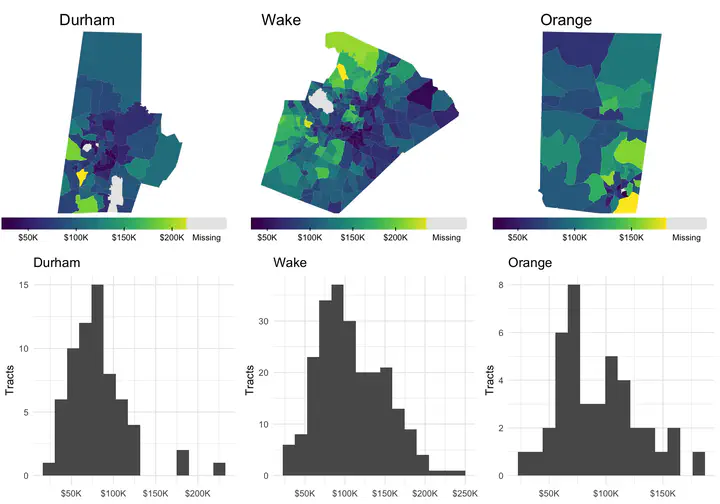
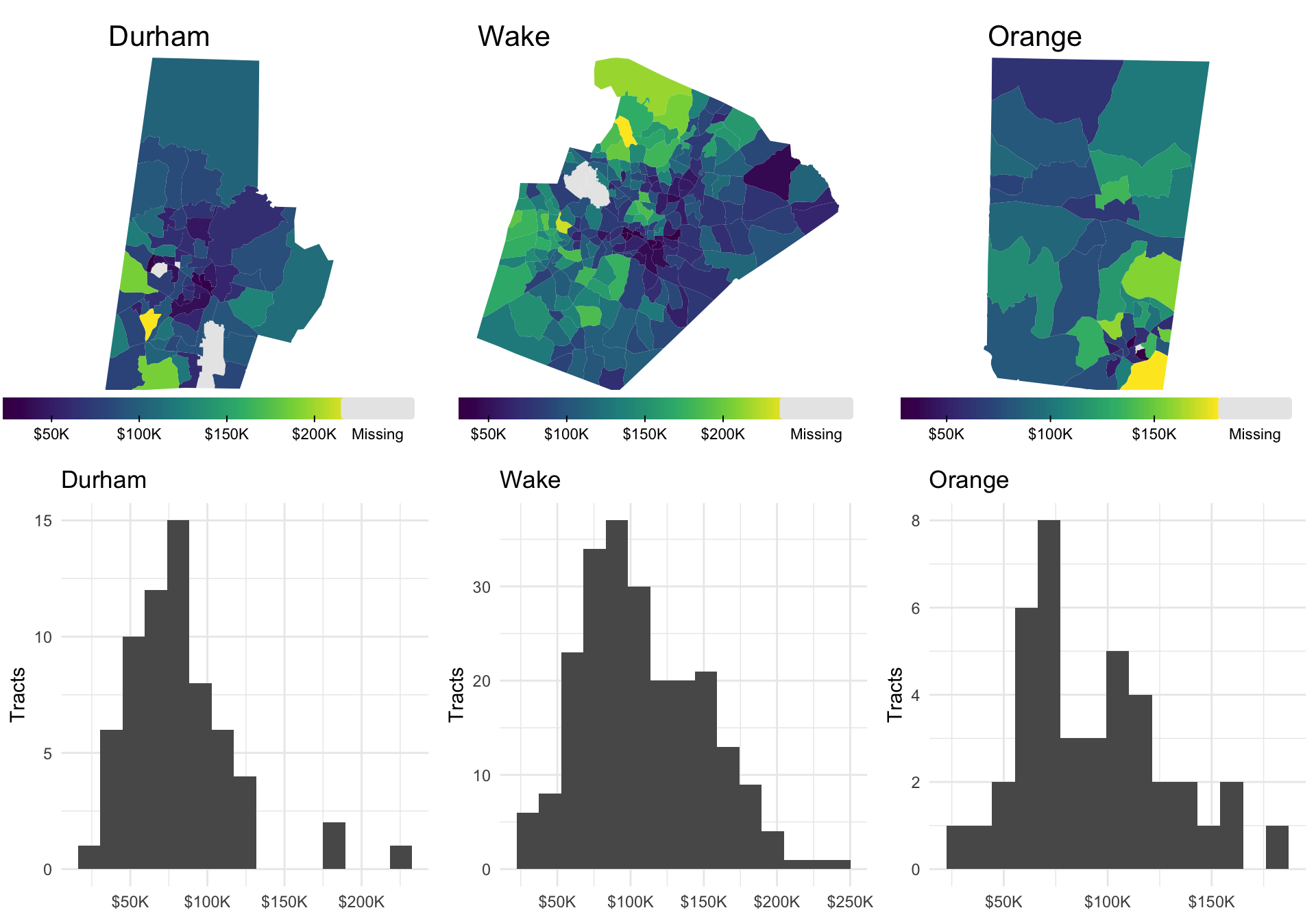
A map (statistical graphic not a function) shows where values are; a histogram shows how they are distributed: whether most tracts cluster in the middle, how long the tail of high incomes is, and how many tracts sit at the extremes. Together they answer questions neither answers alone.
Join tracts_dat onto tract_shapes, write county_map(df, county_name, var) with tmap and county_hist(df, county_name, var) with ggplot2, make one map and one histogram of median income per county with map(), and arrange them in a grid with cowplot: maps on top, histograms below.
Hint: tmap takes column names as strings, so tm_polygons(fill = var) works as is; ggplot needs aes(x = .data[[var]]). Start the join from tract_shapes so the result stays an sf object. Convert each tmap to a grid graphic with tmap_grob(); cowplot::plot_grid() accepts grobs and ggplots alike.
Solution
tract_sf <- tract_shapes |> left_join(tracts_dat, by = "GEOID")

county_map <- function(df, county_name, var) {
  if (!county_name %in% df$county) stop("Unknown county: ", county_name)
  d <- filter(df, county == county_name)
  m <- tm_shape(d) +
    tm_polygons(fill = var, col = NULL,
                fill.scale = tm_scale_continuous(
                  values = "viridis",
                  label.format = list(fun = scales::label_dollar(scale_cut = scales::cut_short_scale()))),
                fill.legend = tm_legend(title = "", frame = FALSE, orientation = "landscape", width = 22,
                                        position = tm_pos_out("center", "bottom"))) +
    tm_title(county_name) +
    tm_layout(frame = FALSE)
  return(m)
}

county_hist <- function(df, county_name, var) {
  d <- filter(df, county == county_name)
  p <- ggplot(d, aes(x = .data[[var]])) +
    geom_histogram(bins = 15) +
    scale_x_continuous(labels = scales::label_dollar(scale_cut = scales::cut_short_scale())) +
    labs(title = county_name, x = NULL, y = "Tracts") +
    theme_minimal()
  return(p)
}

county_maps <- map(counties, \(cn) county_map(tract_sf, cn, "med_income") |> tmap_grob())
county_hists <- map(counties, \(cn) county_hist(tract_sf, cn, "med_income"))

plot_grid(plotlist = c(county_maps, county_hists), nrow = 2)
These solutions provided are one possible solution in R, may be not even the most efficient one. But it would be useful to see if you can best these solutions with your code from an efficiency or a readability perspective.
Conclusions
The Census API, tidycensus, tigris, and the NHGIS crosswalks make the data easy to get. That ease does not replace careful thought about which data to trust, which denominators make sense, which comparisons are fair across time and place, and how to tell a good story.

Nikhil Kaza
Professor
My research interests include urbanization patterns, local energy policy and equity