Extracting Data from OpenStreetMap
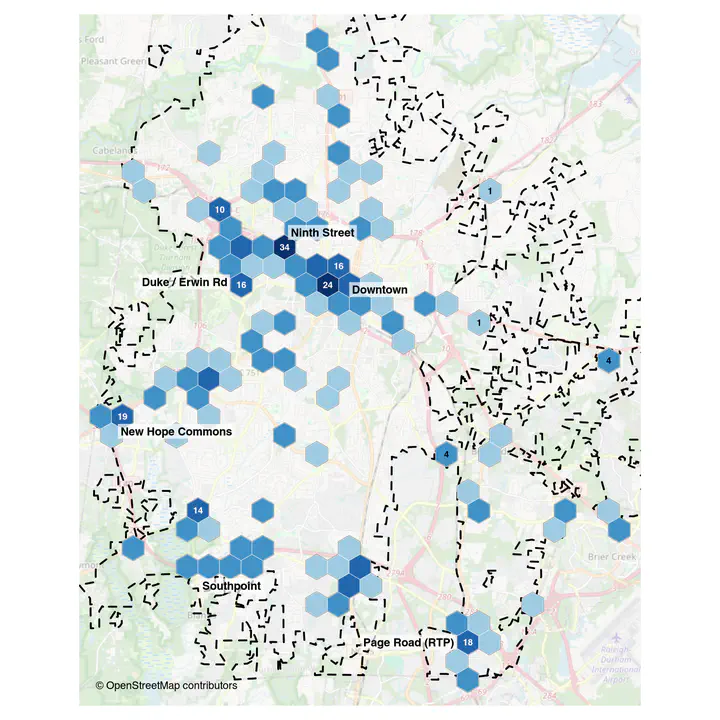 Food places in Durham, NC. Data © OpenStreetMap contributors
Introduction
OpenStreetMap (OSM) is a free and open map of the world, built by millions of volunteers, much like Wikipedia. Anyone can use the data for any purpose, including commercial ones, as long as they credit “© OpenStreetMap contributors” and share any database they derive from it under the same Open Database License (ODbL).
Underneath the map tiles is a database of roads, buildings, shops, bus stops and much more. This post queries the places to eat in Durham, NC out of that database, avoids a few common traps and analyses the completeness and currency of the data.
How OSM data is structured
OSM has only three kinds of objects:
- Nodes are points with a latitude and longitude. A bench, a bus stop or a café drawn as a single point is a node.
- Ways are ordered lists of nodes. An open way is a line (a road, a stream); a closed way is usually an area (a building, a park).
- Relations group other objects. A bus route, a city boundary or a building with a courtyard is a relation.
None of these objects has a fixed “type” or attribute table. Instead, each carries a set of tags, which are key = value pairs. A restaurant might carry:
| key | value |
|---|---|
| amenity | restaurant |
| name | Mateo Bar de Tapas |
| cuisine | spanish |
| addr:street | West Chapel Hill Street |
| opening_hours | Tu-Sa 17:00-22:00 |
Only the first tag says what the object is. The rest are optional, and whether they are filled in depends on whether some volunteer bothered. There is no enforced schema: tags are conventions, documented on the OSM Wiki’s Map Features page, and Taginfo shows how often each is actually used. Keys useful in planning include amenity (restaurants, schools, clinics), shop, highway (roads and bus stops), leisure (parks) and building.
We will use the Overpass API through the osmdata package. This is fine for a small city such as Durham and a handful of tags. For a whole state or country, you can download an extract from Geofabrik instead (the osmextract package) and process it.
Defining the study area
The Census Bureau publishes city boundaries, and tigris downloads them. These are the same boundaries tidycensus attaches to census data. We will just use “3719000” to get Durham’s city limits.
library(tigris)
options(tigris_use_cache = TRUE)

durham <- places(state = "NC", year = 2024, cb = TRUE, progress_bar = FALSE) |>
  filter(GEOID == "3719000") |>        # Durham city
  select(NAME) |>
  st_transform(4326) |>                # Overpass wants longitude and latitude
  st_make_valid()

durham_bb <- st_bbox(durham)
durham_bb
#      xmin      ymin      xmax      ymax
# -79.00754  35.86637 -78.75470  36.13704
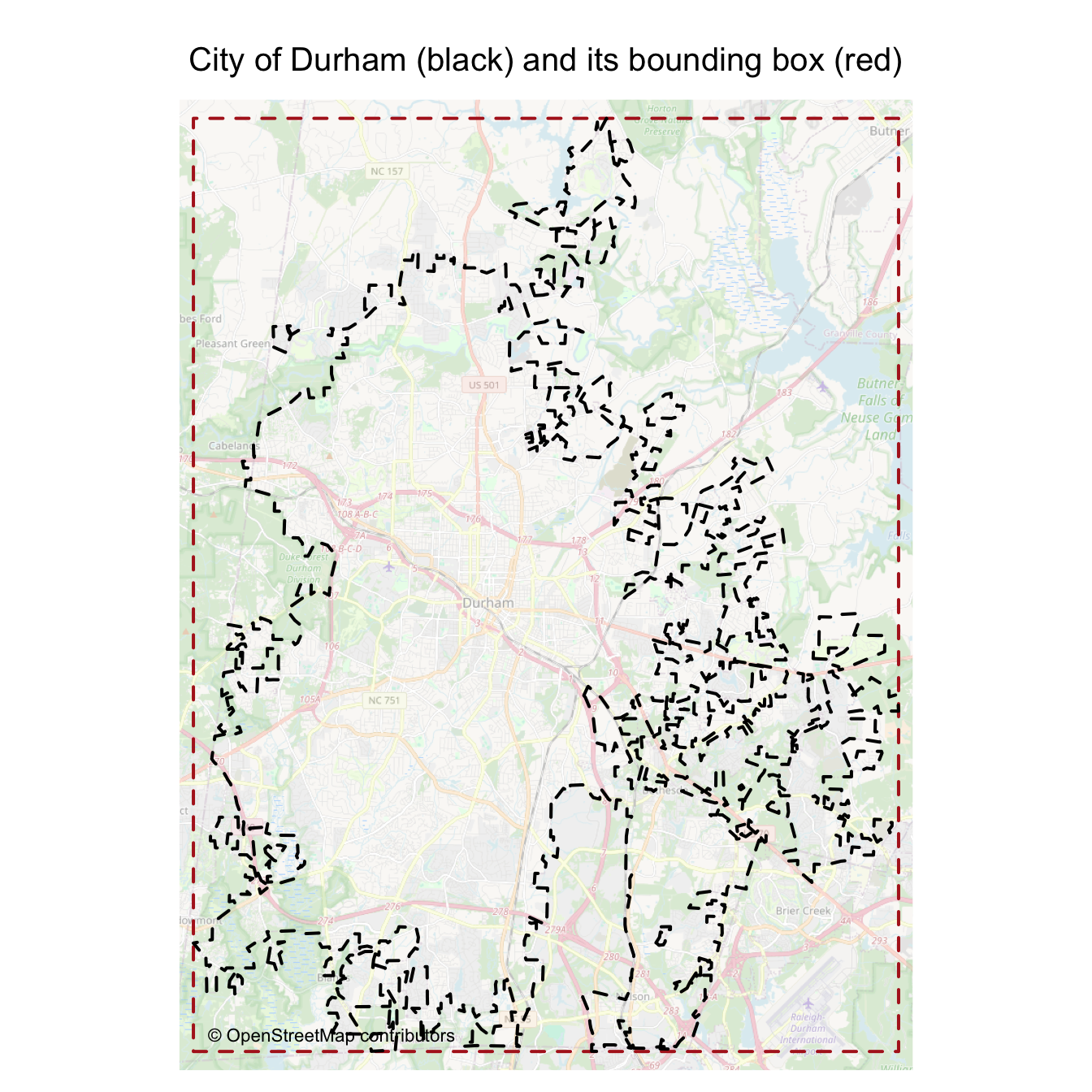
Overpass works with rectangles, so we ask for everything in the city’s bounding box and then keep what falls inside the boundary.
sf can measure distances and areas on the sphere (with the s2 library), in metres.
library(tmap)
tmap_mode("plot")
bb_poly <- st_as_sfc(durham_bb)

tm_shape(bb_poly) +
  tm_borders(col = "firebrick", lwd = 2, lty = "dashed") +
  tm_shape(durham) +
  tm_borders(col = "black", lwd = 2, lty = "dashed", group = "City limits") +
  tm_basemap("OpenStreetMap", alpha = 0.4, zoom = 12) +
  tm_credits("© OpenStreetMap contributors", position = c("left", "bottom")) +
  tm_title("City of Durham (black) and its bounding box (red)") +
  tm_layout(frame = FALSE)
A first query
osmdata builds the query for us: opq() sets the area, add_osm_feature() the tag. opq_string() shows the query in Overpass’s own language.
library(osmdata)
q <- opq(durham_bb, timeout = 60) |>
  add_osm_feature(key = "amenity", value = "restaurant")

q |> opq_string() |> print()
# [1] "[out:xml][timeout:60];\n(\n  node [\"amenity\"=\"restaurant\"] (35.866372,-79.007536,36.137039,-78.754703);\n  way [\"amenity\"=\"restaurant\"] (35.866372,-79.007536,36.137039,-78.754703);\n  relation [\"amenity\"=\"restaurant\"] (35.866372,-79.007536,36.137039,-78.754703);\n);\n(._;>;);\nout body;"
The query asks for every node, way and relation tagged amenity = restaurant in the box, and for enough geometry to draw them. osmdata_sf() sends it to an Overpass server and converts the answer into sf objects.
restaurants <- osmdata_sf(q)
restaurants
# Object of class 'osmdata' with:
#                  $bbox : 35.866372,-79.007536,36.137039,-78.754703
#         $overpass_call : The call submitted to the overpass API
#                  $meta : metadata including timestamp and version numbers
#            $osm_points : 'sf' Simple Features Collection with 1016 points
#             $osm_lines : NULL
#          $osm_polygons : 'sf' Simple Features Collection with 114 polygons
#        $osm_multilines : NULL
#     $osm_multipolygons : NULL
The result is a list of sf layers: osm_points, osm_lines, osm_polygons, osm_multilines and osm_multipolygons.
A sturdier way to call Overpass
Overpass servers are run by volunteers and shared by everyone, and the main one often refuses requests when it is busy. When that happens, osmdata_sf() stops with an HTTP error, often before it has even sent the query (it checks the server’s status first). If the call above failed for you, this is why. Small queries, a fallback server and saving every answer to disk make code that keeps working.
Get your own key. The free public servers are shared by everyone, and the main one allows only two queries at a time from one internet address. Overpass.ch gives each person a free key (10,000 queries a month, one at a time, up to 60 seconds each).
- Create a free account at overpass.ch and confirm your e-mail. Copy the API key from your account page.
- Run
usethis::edit_r_environ()and add a lineOVERPASS_CH_KEY='your-key'. - Restart R.
get_osm() first looks for a saved answer to the same query on disk. If there is none, ask_overpass() tries your overpass.ch server, then the free public servers in turn, and stops at the first one that answers. The answer is saved, and osmdata converts it into sf objects. If a server is busy or unreachable, it says why. The servers are named, so the messages never print your key.
library(httr2)

endpoints <- c(fossgis        = "https://overpass-api.de/api/interpreter",
               vk_maps        = "https://maps.mail.ru/osm/tools/overpass/api/interpreter",
               private_coffee = "https://overpass.private.coffee/api/interpreter",   # formerly overpass.kumi.systems
               osm_fr         = "https://overpass.openstreetmap.fr/api/interpreter")  # last resort: its data can lag by weeks

key <- Sys.getenv("OVERPASS_CH_KEY")   # set in ~/.Renviron, see above
if (key == "") {
  warning("OVERPASS_CH_KEY is not set; using only the shared public servers, which are often full.")
} else {
  endpoints <- c(overpass_ch = paste0("https://api.overpass.ch/v1/", key, "/interpreter"), endpoints)   # your own server first
}

cache_dir <- here::here("osm_cache")   # a folder in your project
if (!dir.exists(cache_dir)) dir.create(cache_dir, recursive = TRUE)

ask_overpass <- function(qs) {          # the raw answer from the first server that replies, or NULL
  for (server in names(endpoints)) {
    resp <- request(endpoints[[server]]) |>
      req_body_form(data = qs) |>
      req_user_agent("osm-tutorial (R httr2)") |>
      req_timeout(180) |>
      req_retry(max_tries = 5,
                is_transient = function(resp) return(resp_status(resp) %in% c(429, 502, 503, 504)),
                backoff = function(attempt) return(30)) |>   # a busy server: wait 30 s and try again
      req_error(is_error = function(resp) return(FALSE)) |>   # inspect the status ourselves
      req_perform() |>
      tryCatch(httr2_failure = function(e) return(e))   # only network failures (no DNS entry, timeout); other errors still stop
    if (inherits(resp, "error")) {
      message(server, " unreachable: ", conditionMessage(resp))
    } else if (resp_status(resp) == 200) {
      text <- resp_body_string(resp)
      problem <- regmatches(text, regexpr("runtime error[^<]*", text))   # Overpass reports some failures inside a 200
      if (length(problem) == 0) return(resp_body_raw(resp))   # success: skip the remaining servers
      message(server, " could not run the query: ", problem)   # e.g. a timeout, or no history on this server
    } else {
      message(server, " answered HTTP ", resp_status(resp))
    }
  }
  return(NULL)
}

get_osm <- function(q) {
  qs   <- opq_string(q)
  file <- file.path(cache_dir, paste0(rlang::hash(qs), ".osm"))   # one file per distinct query
  if (!file.exists(file)) {
    answer <- ask_overpass(qs)
    if (is.null(answer)) stop("No Overpass server answered. Try again later.")
    writeBin(answer, file)
  }
  return(osmdata_sf(q, doc = file))
}
get_osm(q) is a drop-in replacement for osmdata_sf(q). To get fresh data, delete the osm_cache folder in your project.
Using a loop over many different kinds of queries
Restaurants are only one kind of place to eat. Someone interested in “places to eat” would also want fast_food, cafe, bar, pub and food_court. Instead of one large query, we send one query per value, pausing between them to be polite to the server.
food_types <- c("restaurant", "fast_food", "cafe", "bar", "pub", "food_court")

food_raw <- map(food_types, function(v) {
  Sys.sleep(2)
  result <- opq(durham_bb, timeout = 60) |>
    add_osm_feature(key = "amenity", value = v) |>
    get_osm()
  return(result)
}) |>
  set_names(food_types)

str(food_raw, max.level = 1)
# List of 6
#  $ restaurant:List of 8
#   ..- attr(*, "class")= chr [1:3] "osmdata_sf" "osmdata" "list"
#  $ fast_food :List of 8
#   ..- attr(*, "class")= chr [1:3] "osmdata_sf" "osmdata" "list"
#  $ cafe      :List of 8
#   ..- attr(*, "class")= chr [1:3] "osmdata_sf" "osmdata" "list"
#  $ bar       :List of 8
#   ..- attr(*, "class")= chr [1:3] "osmdata_sf" "osmdata" "list"
#  $ pub       :List of 8
#   ..- attr(*, "class")= chr [1:3] "osmdata_sf" "osmdata" "list"
#  $ food_court:List of 8
#   ..- attr(*, "class")= chr [1:3] "osmdata_sf" "osmdata" "list"
food_raw is not a table. It is a list of six osmdata objects, one per query, each with the same layers as restaurants above. To get one table of places, convert each to points, stack them and drop duplicates. Duplicates are rare when looping over values of one key, but common when looping over different keys: a bakery café tagged amenity = cafe and shop = bakery comes back from both queries. OSM ids are unique only within a type, so node 123 and way 123 are different objects. Deduplicate on type and id together. But first we need to deal with a trap.
The vertex trap
If you only use osm_points, it contains every node in the result, including the corners of each building outline. Those corner nodes have no tags.
rest <- food_raw$restaurant
tibble(layer = c("osm_points: every node, including building corners",
                 "osm_points tagged amenity = restaurant",
                 "osm_polygons: restaurants drawn as building outlines",
                 "osm_multipolygons: outlines with holes or several parts"),
       n     = c(nrow(rest$osm_points),
                 sum(!is.na(rest$osm_points$amenity)),
                 nrow(rest$osm_polygons),
                 nrow(rest$osm_multipolygons %||% tibble()))) |>
  knitr::kable(col.names = c("Layer", "Features"))
| Layer | Features |
|---|---|
| osm_points: every node, including building corners | 1016 |
| osm_points tagged amenity = restaurant | 211 |
| osm_polygons: restaurants drawn as building outlines | 114 |
| osm_multipolygons: outlines with holes or several parts | 0 |
Counting all points would inflate the number of restaurants several times over, and the restaurants drawn as building outlines would be represented only by their corners. A good approach keeps tagged points and turns each area into a single representative point (using st_point_on_surface()).
keep <- c("osm_id", "name", "amenity", "cuisine", "opening_hours",
          "addr:street", "addr:housenumber", "website", "phone")

tagged <- function(layer) {     # an empty layer has no amenity column at all
  if (is.null(layer) || !"amenity" %in% names(layer)) return(NULL)
  return(filter(layer, !is.na(amenity)))
}

as_points <- function(x) {
  result <- bind_rows(node     = tagged(x$osm_points),
                      way      = tagged(x$osm_polygons),
                      relation = tagged(x$osm_multipolygons),
                      .id = "osm_type") |>
    st_make_valid() |>
    st_point_on_surface() |>          # areas become one point inside them; points stay put
    select(any_of(c("osm_type", keep)))   # some tags are missing for some types
  return(result)
}

food <- map(food_raw, as_points) |>
  bind_rows() |>
  distinct(osm_type, osm_id, .keep_all = TRUE) |>
  st_filter(durham)           # keep places inside the city

food |>
  st_drop_geometry() |>
  count(amenity, sort = TRUE) |>
  knitr::kable(col.names = c("amenity", "Places"))
| amenity | Places |
|---|---|
| restaurant | 272 |
| fast_food | 155 |
| cafe | 41 |
| bar | 34 |
| pub | 10 |
| food_court | 2 |
There are 514 places to eat in the city of Durham in OSM today, of which 272 are restaurants.
Exercise 1: Which boundary?
- How many food places are inside Durham’s bounding box but outside the city? What share of all places in the box is that?
- OSM has its own city boundary, drawn by volunteers. Download it with
getbb("Durham, North Carolina", format_out = "sf_polygon"), which asks Nominatim, OSM’s place-name search, and compare its area with the Census boundary.
Hint: for (1), combine food_raw without the st_filter() step, then use st_filter() with .predicate = st_disjoint. For (2), st_area() and units::set_units().
Solution
food_box <- map(food_raw, as_points) |>
  bind_rows() |>
  distinct(osm_type, osm_id, .keep_all = TRUE)

outside <- st_filter(food_box, durham, .predicate = st_disjoint)
tibble(in_box = nrow(food_box), outside_city = nrow(outside),
       share_outside = scales::percent(nrow(outside) / nrow(food_box))) |>
  knitr::kable(col.names = c("In the box", "Outside the city", "Share outside"))
| In the box | Outside the city | Share outside |
|---|---|---|
| 608 | 94 | 15% |
Anything counted “per city” from a bounding box would be badly off.
durham_osm <- getbb("Durham, North Carolina", format_out = "sf_polygon") |>
  filter(addresstype == "city") |>
  st_make_valid()

tibble(boundary = c("Census (tigris)", "OSM (Nominatim)"),
       area     = c(sum(st_area(durham)), sum(st_area(durham_osm)))) |>
  mutate(area = area |> set_units(mi^2) |> round(1)) |>
  knitr::kable(col.names = c("Boundary", "Area"))
| Boundary | Area |
|---|---|
| Census (tigris) | 119.9 [mi^2] |
| OSM (Nominatim) | 115.1 [mi^2] |
Cities annex land every year, and each source catches up on its own schedule. Be mindful.
Visualise the data
An interactive map
Since it is an sf object, we can use tmap to visualise either as interactive map or as a plot.
library(tmap.mapgl)   # adds the "maplibre" mode, which draws vector basemaps such as OpenFreeMap
tmap_mode("maplibre")

m_food <- tm_shape(durham) +
  tm_borders(col = "olivedrab4", lwd = 2, lty = "dashed", group = "City limits") +
  tm_shape(food) +
  tm_dots(fill = "firebrick",
          size = 0.2,
          id = "name",
          popup = tm_popup(vars = c("amenity", "cuisine", "opening_hours", "addr:street", "website")),
          group = "Places to eat") +
  tm_basemap("ofm.positron", group = "OpenFreeMap basemap")

frameWidget(tmap_maplibre(m_food))
Density on a hexagonal grid
With hundreds of points, a dot map hides the overlap downtown. Counting points in equal-area hexagons shows where food places concentrate.
st_make_grid() works on a flat plane, so this is the one place we project: build the grid in North Carolina State Plane (EPSG:32119, metres) and bring it straight back.
hex <- st_transform(durham, 32119) |>
  st_make_grid(cellsize = 800, square = FALSE) |>   # 800 m across the flats
  st_transform(4326) |>
  st_as_sf() |>
  st_filter(durham, .predicate = st_intersects) |>   # whole hexagons that touch the city, not clipped
  mutate(hex_id = row_number())

hex$n_food <- lengths(st_intersects(hex, food))
The basemap supplies roads and place names. We add labels for the places discussed below. Be very intentional with your visualisations. Much of the code below is to make the map as legible to the reader as possible. This is after a lot of iterations. You should expect to do so. Thus you might want to build your story around specific visualisations you have laboured over, rather than visualisaions that you are using for your exploratory data analysis.
landmarks <- tribble(   # coordinates read off openstreetmap.org; dx, dy move the label off the cluster
  ~label,             ~lon,     ~lat,     ~dx,  ~dy,
  "Ninth Street",     -78.9232, 36.0100,   2.8,  1.1,
  "Downtown",         -78.9030, 35.9960,   3.4,  0,
  "Duke / Erwin Rd",  -78.9410, 35.9985,  -4.2,  0,
  "New Hope Commons", -78.9898, 35.9538,   4,   -1.1,
  "Southpoint",       -78.9450, 35.9030,   0,   -1.2,
  "Page Road (RTP)",  -78.8480, 35.8788,  -4.4,  0) |>
  st_as_sf(coords = c("lon", "lat"), crs = 4326)

tmap_mode("plot")
food_hex <- hex |>
  filter(n_food > 0) |>
  mutate(class = cut(n_food, breaks = c(0, 2, 9, 19, Inf), labels = c("1-2", "3-9", "10-19", "20+")))
food_hex$neighbours  <- lengths(st_touches(food_hex))
food_hex$to_landmark <- apply(st_distance(food_hex, landmarks), 1, min)   # metres to the nearest label

examples <- food_hex |>              # two labelled hexagon per colour, plus the outliers; no legend needed
  arrange(neighbours, desc(to_landmark)) |>
  slice_head(n = 2, by = class) |>   # an isolated hexagon away from the labels is easiest to see
  bind_rows(filter(food_hex, n_food >= 15)) |>
  distinct(hex_id, .keep_all = TRUE) |>
  mutate(text_col = if_else(class %in% c("1-2", "3-9"), "black", "white"))

m_hex <- tm_basemap("OpenStreetMap", alpha = 0.4, zoom = 12) +
  tm_shape(food_hex) +
  tm_borders(col = NA) +                 # first shape sets the extent: zoom to the hexagons
  tm_shape(durham) +
  tm_borders(col = "black", lwd = 2, lty = "dashed", group = "City limits") +
  tm_shape(food_hex) +
  tm_polygons(fill = "class",
              fill.scale = tm_scale_categorical(values = c("#9ecae1", "#4292c6", "#2166ac", "#08306b")),   # blues: no clash with OSM's green parks
              fill.legend = tm_legend_hide(),
              col = "white", lwd = 0.4) +
  tm_shape(examples) +
  tm_text("n_food", size = 0.6, col = "text_col", col.scale = tm_scale_asis(), fontface = "bold") +
  tm_shape(landmarks) +
  tm_text("label", size = 0.75, fontface = "bold", xmod = "dx", ymod = "dy",
          bgcol = "white", bgcol_alpha = 0.7) +
  tm_credits("© OpenStreetMap contributors", position = c("left", "bottom")) +
  tm_layout(frame = FALSE)

m_hex + tm_title("Places to eat in Durham, 800 m hexagons")
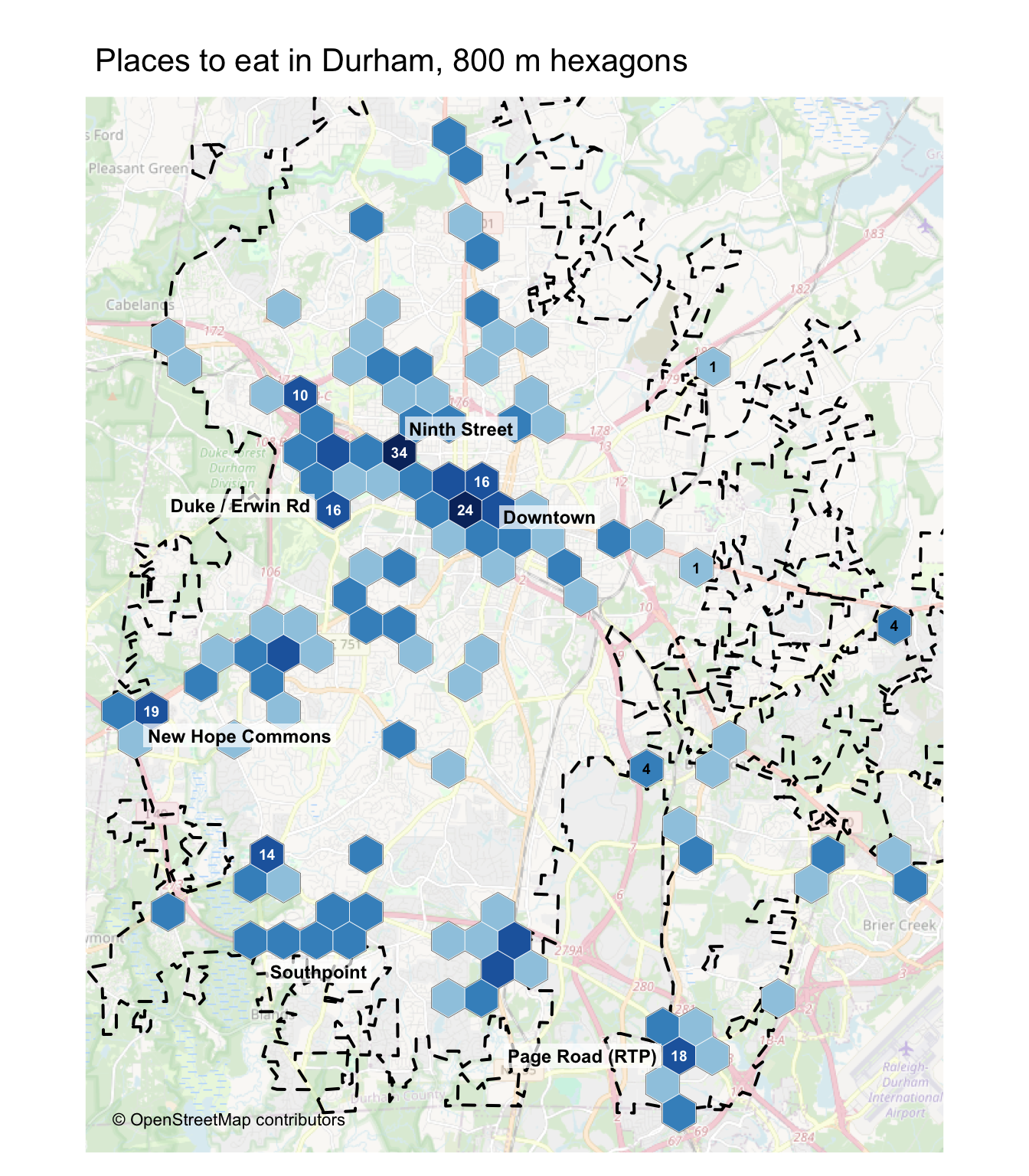
Ninth Street, next to Duke’s East Campus, is the densest cluster, followed by downtown. The rest are shopping centres at freeway interchanges: New Hope Commons where US 15-501 meets I-40, Southpoint off I-40 and the strip along Page Road near Research Triangle Park.
Exercise 2: Supermarkets
Download supermarkets (shop = supermarket) in Durham from OpenStreetMap. Then, for each hexagon in hex, compute the straight-line distance from its centre to the nearest supermarket, and map it. Which parts of the city are more than 2 km from one?
Hint: st_nearest_feature() returns the index of the nearest feature; st_distance(..., by_element = TRUE) then gives the distance to it.
Solution
supermarkets <- opq(durham_bb, timeout = 60) |>
  add_osm_feature(key = "shop", value = "supermarket") |>
  get_osm()
supermarkets <- bind_rows(
  supermarkets$osm_points |> filter(!is.na(shop)),
  bind_rows(supermarkets$osm_polygons, supermarkets$osm_multipolygons) |>
    st_make_valid() |> st_point_on_surface()) |>
  select(osm_id, name)
hex_centres <- st_centroid(hex)
nearest <- st_nearest_feature(hex_centres, supermarkets)
hex$dist <- st_distance(hex_centres, supermarkets[nearest, ], by_element = TRUE) |>
  set_units(km)
far <- set_units(2, km)

tmap_mode("plot")
tm_basemap("OpenStreetMap", alpha = 0.4, zoom = 12) +
  tm_shape(durham) +
  tm_borders(col = "black", lwd = 2, lty = "dashed", group = "City limits") +
  tm_shape(hex |> filter(dist > far)) +
  tm_polygons(fill = "#6a51a3", fill_alpha = 0.55, col = "white", lwd = 0.2) +
  tm_shape(supermarkets) +
  tm_dots(fill = "black", size = 0.3) +
  tm_title("Shaded: more than 2 km in a straight line from a supermarket (black dots)", size = 0.8) +
  tm_credits("© OpenStreetMap contributors", position = c("left", "bottom")) +
  tm_layout(frame = FALSE)
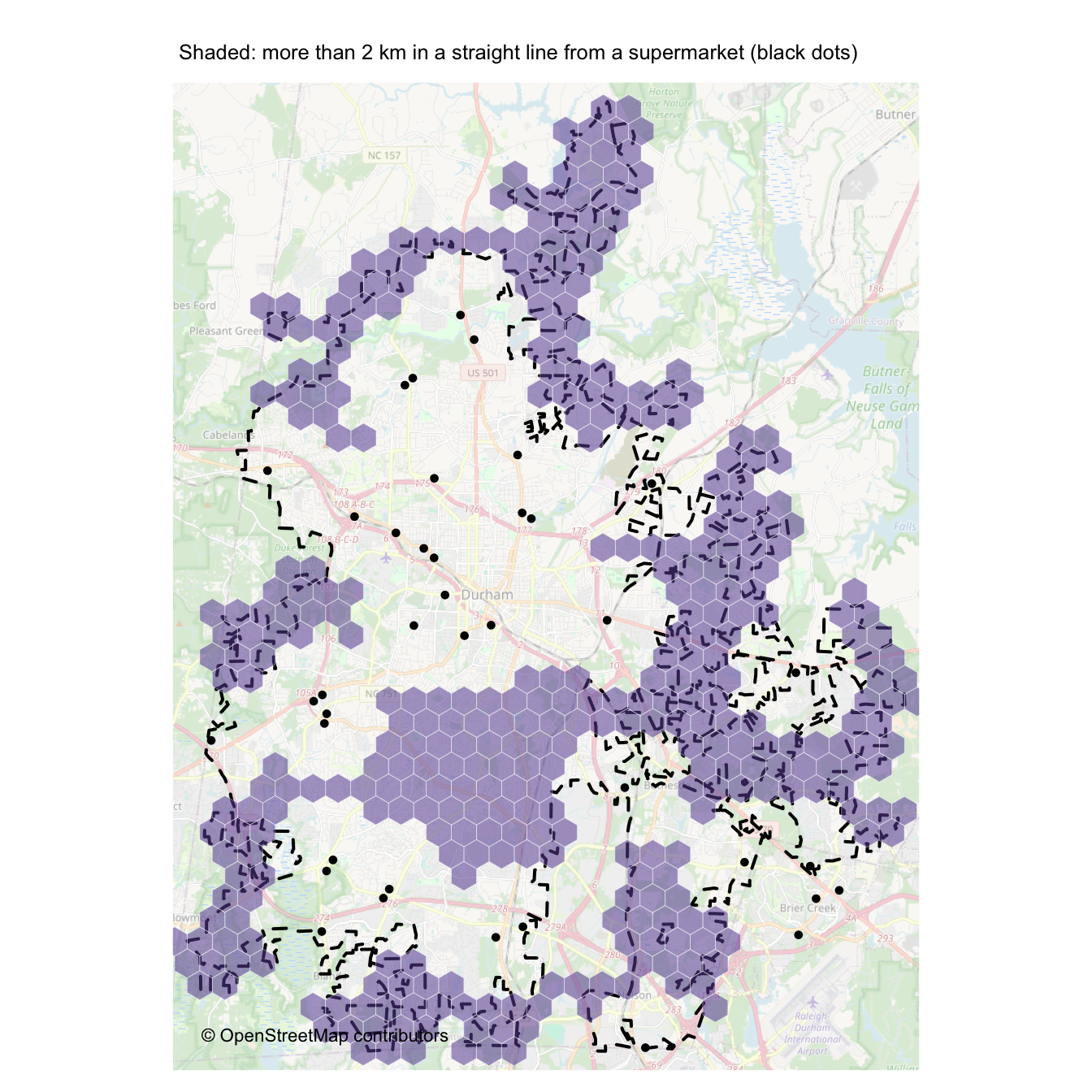
scales::percent(mean(hex$dist > far))   # share of hexagons more than 2 km away
# [1] "47%"
Straight-line distance understates the real trip. Be cautious. Clipping data to the boundary ahead of time introduces spurious boundary effects.
Exercise 3: Food near transit
What share of Durham’s food places are within 400 m (about a five-minute walk) of a bus stop? Bus stops are tagged highway = bus_stop.
Solution
bus <- opq(durham_bb, timeout = 60) |>
  add_osm_feature(key = "highway", value = "bus_stop") |>
  get_osm()
bus_stops <- bus$osm_points |>
  filter(!is.na(highway))

near_bus <- lengths(st_is_within_distance(food, bus_stops, dist = 400)) > 0   # metres, on the sphere

food |>
  st_drop_geometry() |>
  mutate(near_bus = near_bus) |>
  summarise(places = n(), share_near_bus = scales::percent(mean(near_bus)), .by = amenity) |>
  knitr::kable(col.names = c("amenity", "Places", "Within 400 m of a bus stop"))
| amenity | Places | Within 400 m of a bus stop |
|---|---|---|
| restaurant | 272 | 95% |
| fast_food | 155 | 96% |
| cafe | 41 | 95% |
| bar | 34 | 100% |
| pub | 10 | 100% |
| food_court | 2 | 100% |
Mapping of bus stops is uneven; GoDurham publishes its stops as GTFS, which would be a better source for real work.
How complete are the tags?
OSM is often very good at where things are and much weaker on their attributes. Before you analyse cuisine or opening hours, check how often they are filled in.
tag_cols <- c("name", "cuisine", "opening_hours", "addr:street", "website", "phone")

share_present <- function(x) {
  return(mean(!is.na(x)))
}

completeness <- food |>
  st_drop_geometry() |>
  summarise(across(all_of(tag_cols), share_present)) |>
  pivot_longer(everything(), names_to = "tag", values_to = "share")

ggplot(completeness, aes(x = share, y = fct_reorder(tag, share))) +
  geom_col(fill = "steelblue", width = 0.7) +
  geom_text(aes(label = scales::percent(share, accuracy = 1)), hjust = -0.15, size = 3.5) +
  scale_x_continuous(labels = scales::percent, limits = c(0, 1.08)) +
  labs(x = "Share of Durham's food places with the tag", y = NULL,
       caption = "Data © OpenStreetMap contributors") +
  theme_minimal()
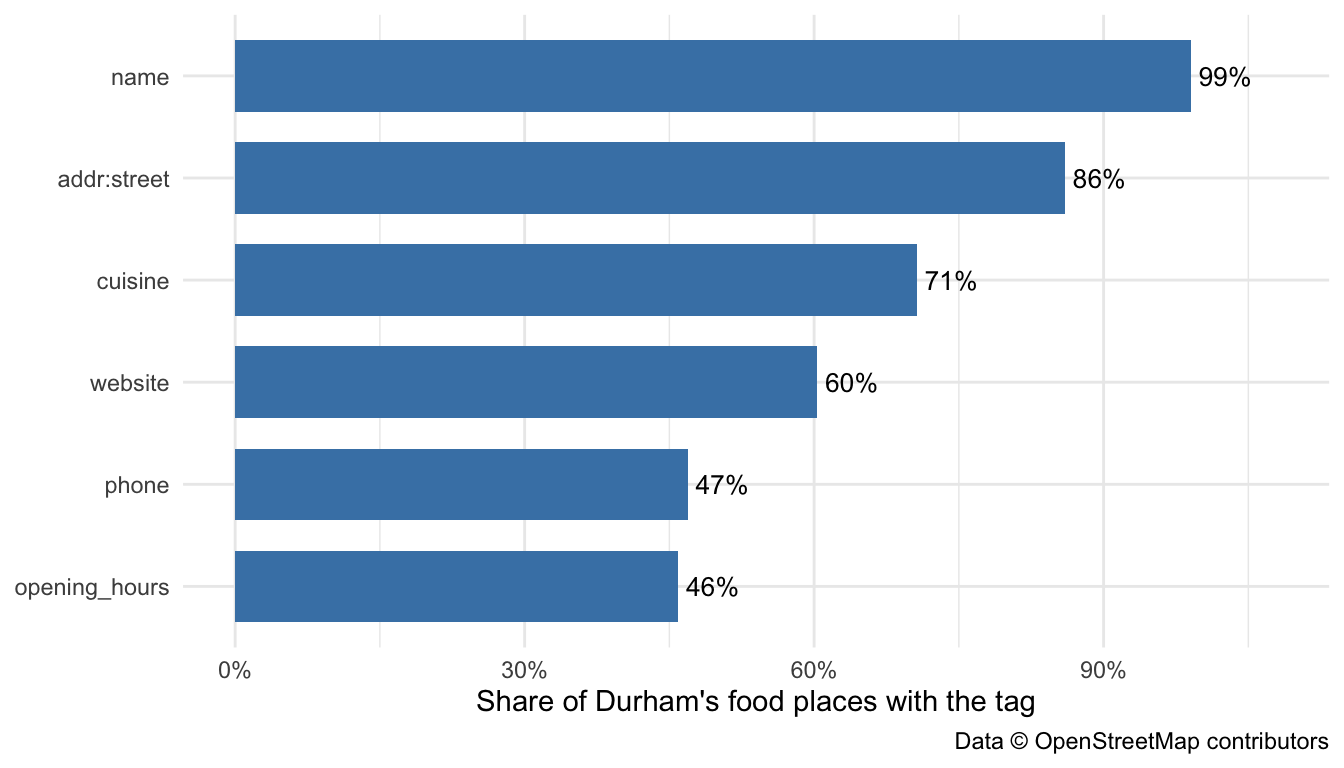
Names are nearly always present, because a nameless café is hard to map. Opening hours and websites are much patchier. Completeness can also vary across space, since tags depend on whether an active mapper lives nearby. An analysis that drops places with missing tags may quietly drop whole neighbourhoods; mapping the places with no opening_hours is a quick check.
Exercise 4: What cuisines?
List the ten most common cuisines among Durham’s restaurants. Some places list more than one, separated by semicolons (mexican;tex-mex); count each separately. What share of restaurants have no cuisine at all, in the dataset?
Hint: use separate_longer_delim().
Solution
rest_now <- food |> filter(amenity == "restaurant")

rest_now |>
  st_drop_geometry() |>
  filter(!is.na(cuisine)) |>
  separate_longer_delim(cuisine, delim = ";") |>
  mutate(cuisine = str_trim(str_to_lower(cuisine))) |>
  count(cuisine, sort = TRUE) |>
  slice_head(n = 10) |>
  knitr::kable(col.names = c("Cuisine", "Restaurants"))
| Cuisine | Restaurants |
|---|---|
| american | 31 |
| mexican | 23 |
| pizza | 18 |
| sandwich | 13 |
| asian | 11 |
| italian | 10 |
| japanese | 10 |
| burger | 8 |
| barbecue | 7 |
| breakfast | 7 |
scales::percent(mean(is.na(rest_now$cuisine)))   # share with no cuisine tag
# [1] "30%"
With that many missing, “Durham has few Thai restaurants” might only mean “few Thai restaurants are tagged.” But I know from experience that the triangle is sorely lacking in good Thai food.
Reproducibility vs. Currency
OSM is edited thousands of times a minute. Running the same query next month will give a different answer, which is good for timeliness and bad for reproducibility. Overpass can, however, query OSM as it was on a past date, using the datetime argument. Here are Durham’s restaurants on the day this post was first published.
rest_2020 <- opq(durham_bb, timeout = 60, datetime = "2020-02-12T00:00:00Z") |>
  add_osm_feature(key = "amenity", value = "restaurant") |>
  get_osm() |>
  as_points() |>
  st_filter(durham)

rest_now <- food |> filter(amenity == "restaurant")
status <- full_join(
  rest_2020 |> st_drop_geometry() |> transmute(osm_type, osm_id, in_2020 = TRUE),
  rest_now  |> st_drop_geometry() |> transmute(osm_type, osm_id, in_now = TRUE),
  by = c("osm_type", "osm_id")) |>
  mutate(status = case_when(in_2020 & in_now ~ "in both",
                            is.na(in_now)    ~ "only in 2020",
                            is.na(in_2020)   ~ "only now"))
count(status, status) |>
  knitr::kable(col.names = c("", "Restaurants"))
| Restaurants | |
|---|---|
| in both | 147 |
| only in 2020 | 38 |
| only now | 125 |
OSM had 185 restaurants in the city in February 2020 and has 272 now. Some of the change is real: restaurants open and close. Some of it is mapping: new restaurants are added long after they open, closed ones linger and a restaurant redrawn from a point to a building outline gets a new osm_id even though nothing changed on the ground.
For reproducible work, record the date you downloaded the data, save the data you used or query a fixed date with datetime, as above.
Comparing with Overture Maps
No single source of points of interest is complete, so it helps to compare OSM with an independent one. Overture Maps, backed by Amazon, Meta, Microsoft and TomTom, publishes an open places layer built from Facebook business pages, business registries and listings from Microsoft and Foursquare, not from OSM.
Overture releases are GeoParquet files in public cloud storage, with no API. The DuckDB database engine reads just the parts inside our bounding box, directly over the internet. Pinning the release date keeps the query reproducible while that release stays online.
library(duckdb)
con <- dbConnect(duckdb())
invisible(dbExecute(con, "INSTALL spatial; LOAD spatial; INSTALL httpfs; LOAD httpfs; SET s3_region = 'us-west-2';"))

ov_release <- "2026-10-21.0"   # see https://docs.overturemaps.org/release/latest/
ov_places  <- str_glue("s3://overturemaps-us-west-2/release/{ov_release}/theme=places/type=place/*")

ov_sql <- str_glue("
  SELECT id, names.primary AS name, taxonomy.hierarchy AS hierarchy,
         confidence, operating_status, sources[1].dataset AS source,
         ST_AsText(geometry) AS geometry
  FROM read_parquet('{ov_places}')
  WHERE bbox.xmin > {durham_bb['xmin']} AND bbox.xmax < {durham_bb['xmax']}
    AND bbox.ymin > {durham_bb['ymin']} AND bbox.ymax < {durham_bb['ymax']}")

overture <- dbGetQuery(con, ov_sql) |>
  st_as_sf(wkt = "geometry", crs = 4326) |>   # keep the usual column name, so bind_rows() works later
  st_filter(durham)
dbDisconnect(con, shutdown = TRUE)

nrow(overture)
# [1] 17506
The query takes seconds and returns every place in the city, from restaurants to dentists to churches. Where do they come from?
overture |>
  st_drop_geometry() |>
  count(source, sort = TRUE) |>
  knitr::kable(col.names = c("Source", "Places"))
| Source | Places |
|---|---|
| meta | 8068 |
| BrightQuery | 4725 |
| Microsoft | 3220 |
| Foursquare | 1079 |
| AllThePlaces | 252 |
| Uberall | 72 |
| DAC | 66 |
| PinMeTo | 17 |
| Birdeye | 4 |
| OpenTravel | 2 |
| RenderSEO | 1 |
Each place also has a category hierarchy. Food places sit under food_and_drink:
is_food <- function(h) {          # h is one place's category hierarchy, e.g. c("food_and_drink", "restaurant")
  return(length(h) > 1 && h[1] == "food_and_drink")
}

overture_food <- overture |>
  filter(map_lgl(hierarchy, is_food)) |>
  mutate(category = map_chr(hierarchy, 2),
         amenity  = case_when(category == "restaurant"                   ~ "restaurant",
                              category == "casual_eatery"                ~ "fast_food",
                              category == "non_alcoholic_beverage_venue" ~ "cafe",
                              category == "alcoholic_beverage_venue"     ~ "bar or pub")) |>
  filter(!is.na(amenity))
The categories only roughly match OSM’s tags: “casual eatery” includes bakeries that OSM tags as shop, and Overture does not separate bars from pubs. Overture also has operating_status, which flags closed places, and confidence, its 0 to 1 estimate that a place exists. We keep open places with a confidence of at least 0.7.
ov <- overture_food |>
  filter(operating_status != "permanently_closed" | is.na(operating_status),
         confidence >= 0.7) |>
  select(ov_id = id, ov_name = name, amenity, confidence, source)

osm <- food |>
  mutate(amenity = if_else(amenity %in% c("bar", "pub"), "bar or pub", amenity)) |>
  filter(amenity != "food_court") |>
  select(osm_id, osm_name = name, amenity)

bind_rows(osm = st_drop_geometry(osm), overture = st_drop_geometry(ov), .id = "source") |>
  count(source, amenity) |>
  pivot_wider(names_from = source, values_from = n) |>
  knitr::kable(col.names = c("Type", "OSM", "Overture"))
| Type | OSM | Overture |
|---|---|---|
| bar or pub | 44 | 124 |
| cafe | 41 | 89 |
| fast_food | 155 | 374 |
| restaurant | 272 | 773 |
Overture lists about 2.7 times as many places as OSM. Some of the gap is OSM missing businesses, especially new ones. Some is Overture’s noise: duplicates, stale listings and businesses filed in the wrong category, inherited from social media. Neither source is the truth; it is often best to triangulate from multiple sources.
Exercise 5: How much does confidence matter?
Recount Overture’s places by type with confidence thresholds of 0.5, 0.7 and 0.9. How much do the totals move? What does that say about any “number of restaurants” taken from a single source?
Solution
count_at <- function(threshold) {
  result <- overture_food |>
    st_drop_geometry() |>
    filter(operating_status != "permanently_closed" | is.na(operating_status),
           confidence >= threshold) |>
    count(amenity, name = paste("confidence ≥", threshold))
  return(result)
}

map(c(0.5, 0.7, 0.9), count_at) |>
  reduce(left_join, by = "amenity") |>
  knitr::kable()
| amenity | confidence ≥ 0.5 | confidence ≥ 0.7 | confidence ≥ 0.9 |
|---|---|---|---|
| bar or pub | 137 | 124 | 107 |
| cafe | 97 | 89 | 81 |
| fast_food | 409 | 374 | 317 |
| restaurant | 814 | 773 | 681 |
The count depends on a threshold someone chose. Any published number of points of interest rests on a similar choice, even when it is not visible.
Conclusion
OpenStreetMap offers an extraordinary resource: a global, openly maintained map that anyone can use. To make the most of it, credit the contributors, be considerate of shared services, verify the tags you rely on, and keep a record of when your data was obtained. Above all, treat any points-of-interest dataset as a product of how it was collected. Good analysis starts not just with data, but with an understanding of where that data came from and what it may be missing and what biases it encodes both deliberately and inadvertently.
Acknowledgements
The first version of this post was written by Kshitiz Khanal.